Introduction
In the rapidly evolving world of wireless communication and the Internet of Things (IoT), the ZigBee protocol stands out as a cornerstone for low-power, mesh networking applications. From smart homes and intelligent lighting to advanced industrial automation and utility metering, ZigBee technology has become deeply embedded in our connected world. At the heart of many ZigBee solutions are Digi International’s XBee modules, which have become the industry standard for developers and integrators building wireless sensor networks and control systems.
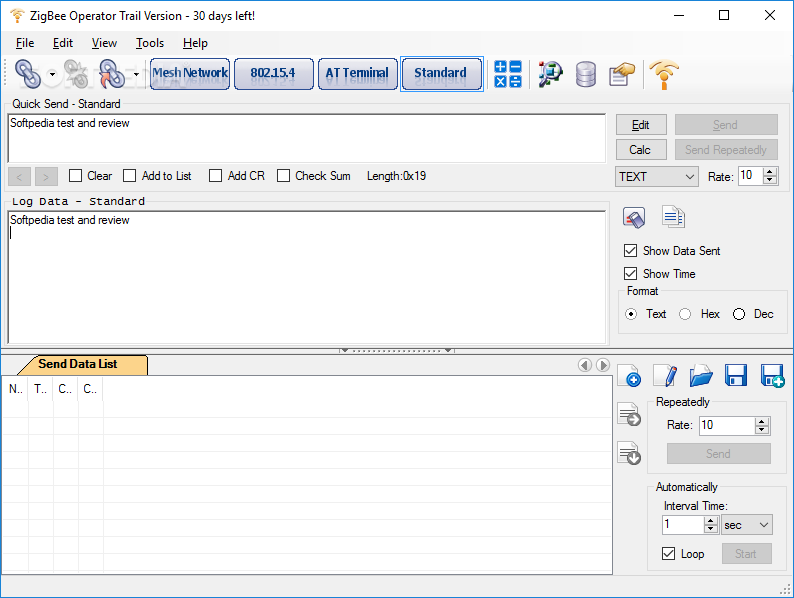
However, working with these sophisticated modules requires powerful yet user-friendly tools for development, testing, and debugging. This is where ZigBee Operator enters the picture. Designed as a professional-grade utility, ZigBee Operator provides a comprehensive platform for learning, researching, configuring, developing, and testing Digi’s ZigBee and XBee modules. Whether you are an embedded systems engineer, a network architect, an IoT hobbyist, or a student, understanding the capabilities of ZigBee Operator can significantly streamline your workflow. This article offers an in-depth exploration of ZigBee Operator, covering its features, technical specifications, user interface, practical applications, and the broader context of ZigBee development .
What is ZigBee Operator?
ZigBee Operator is a specialized software application designed to serve as a complete development environment for Digi’s XBee and ZigBee wireless modules. Its core purpose is to provide a bridge between a computer and these modules, allowing users to configure devices, send and receive data, and analyze complex network behavior with ease .
Developed by Serial Port Tool, the software is a professional tool that implements both an API encoder and decoder for Digi’s XBee, ZigBee Mesh, and 802.15.4 protocols . This means it can communicate with XBee modules using both the simple AT command mode and the more complex but powerful API (Application Programming Interface) frame mode. As of its latest versions, ZigBee Operator is a commercial product, typically offered under a shareware or trial license, reflecting its status as a professional development tool .
Key Features at a Glance
Based on developer descriptions and user reviews, ZigBee Operator packs a significant number of features into a single application:
- Protocol Support: Supports all of Digi’s ZigBee and XBee firmware versions and works with both ZigBee Mesh and 802.15.4 protocols .
- Command Modes: Fully supports both the simple AT command model and the advanced API model for communication and configuration .
- API Frame Handling: Implements a full API encoder and decoder, allowing users to construct and decode API frames with detailed information, a feature essential for advanced control and monitoring .
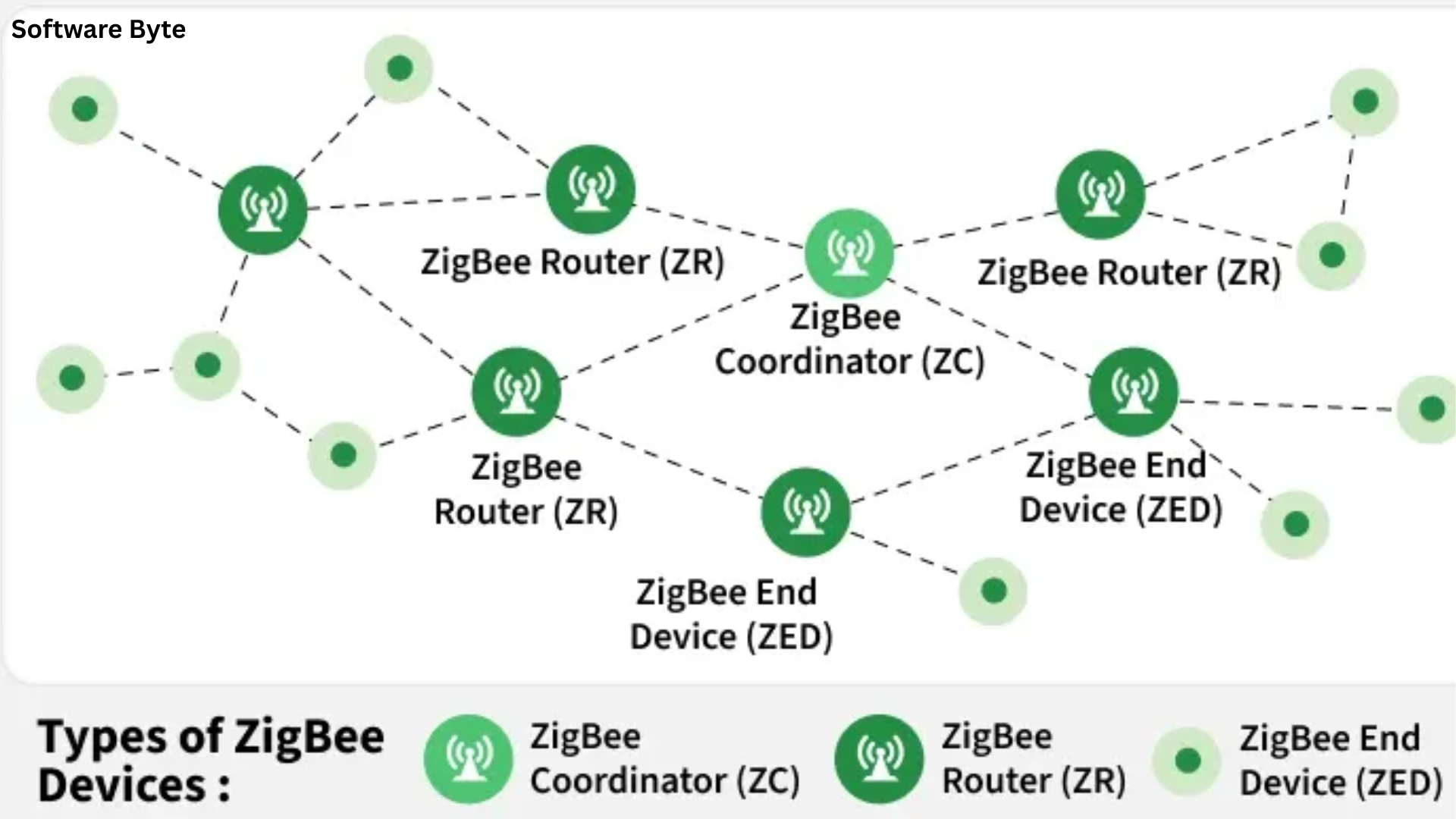
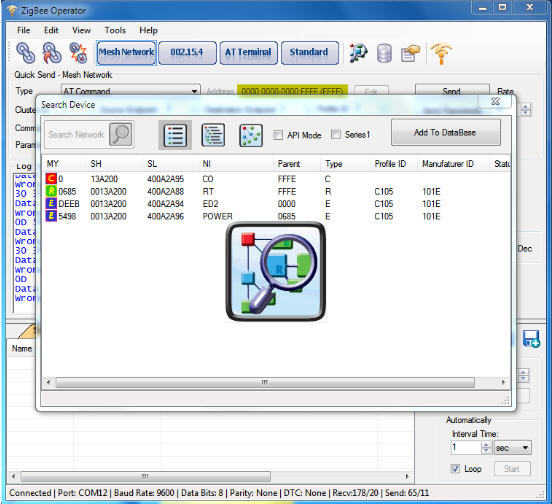
- Network Visualization: Provides a graphical representation of the mesh topology, allowing users to “explorer all modules in searching range” and understand the structure of their network .
- Remote Operation: Works with modules remotely through a network connection (TCP server, UDP), not just those physically connected via serial port .
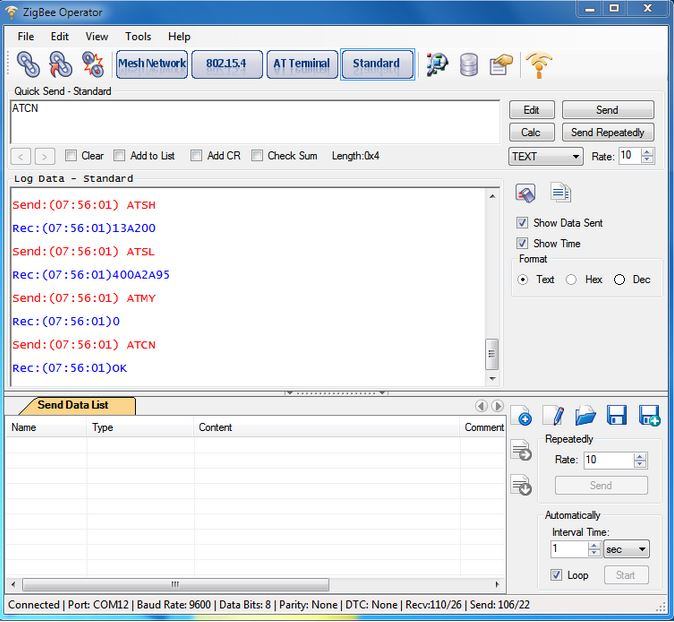
- Data Management: Can store module properties in a database, save received data, and create custom data lists (in Text, Hex, Dec, or file formats) to send back to modules .
- Automation: Users can set the application to automatically send packages at specified time intervals .
- User Interface: A well-structured interface with tabs for different connection modes (Mesh, 802.15.4, AT Terminal) that simplifies complex tasks .
Understanding ZigBee and XBee Modules
Before diving deeper into ZigBee Operator, it is helpful to understand the technology it is designed to work with. ZigBee is a specification for a suite of high-level communication protocols based on the IEEE 802.15.4 standard for low-power, low-data-rate digital radios. It is a global standard, with the ZigBee Alliance (now part of the Connectivity Standards Alliance) overseeing its development .
The Role of Digi’s XBee Modules
Digi International’s XBee modules are one of the most popular and widely used families of radio frequency (RF) modules that implement the ZigBee protocol. They provide a simple, integrated solution for adding wireless connectivity to a product. The modules handle the complexity of the ZigBee stack, allowing developers to focus on their application logic. They communicate with a host processor (like a microcontroller or a PC) through a serial interface (UART), using either AT commands or API frames .
AT Commands vs. API Mode
A fundamental concept when working with XBee modules is the distinction between AT and API modes.
- AT Command Mode: This is a simple, text-based command interface. Users can enter commands like
+++to enter command mode and then type commands (e.g.,ATIDto read the network ID) to configure the module or perform simple actions. It is straightforward for basic configuration and manual testing but limited for complex or dynamic network interactions . - API (Application Programming Interface) Mode: In API mode, the module communicates using structured binary data packets called API frames . Each API frame contains not only the data payload but also crucial metadata like the destination and source addresses, command types, signal quality, and checksum for error checking . API mode is far more powerful than AT mode. It enables features like:
- Addressing: Sending data to specific nodes or groups of nodes.
- Acknowledgments: Knowing if a transmission was successfully delivered.
- Remote Configuration: Changing settings on a remote module over the air.
- Advanced Diagnostics: Receiving detailed status and diagnostic information from modules .
ZigBee Operator’s support for both modes, and its particular strength in API mode, is what makes it a vital tool for serious development.
ZigBee Operator Interface and Usage
One of the key strengths of ZigBee Operator is its well-structured and intuitive interface, which helps users navigate the complexity of wireless network development . The main window is typically organized with tabs for different connection modes and tasks.
Connection Setup
Before any work can be done, the user must establish a connection with an XBee module. ZigBee Operator provides a flexible and straightforward setup for this.
- Serial Port Detection: The application can automatically scan and list all available serial ports (COM ports) on the computer, often identifying them with a friendly name . This simplifies the process of finding which port your module is connected to.
- Manual Connection: Users can also manually configure a connection, providing values for serial port mode (baud rate, data bits, parity, stop bits) .
- Remote Connection: For more advanced use cases, ZigBee Operator supports connecting to modules remotely via a network. This is achieved through a TCP server or UDP connection, allowing engineers to manage devices in the field from a central location .
Working with API Frames
The core of ZigBee Operator’s utility is its powerful API frame encoder and decoder. This is where the application truly shines.
When a module in API mode sends an API frame to the computer, ZigBee Operator receives it, parses the raw byte stream, and decodes it . It then presents the information in a human-readable format, breaking down the frame into its constituent parts:
- Start Delimiter: Identifies the beginning of a new frame (always
0x7E) . - Length: The length of the data payload .
- Frame Data: This includes the Frame Type (e.g., a TX request or an RX packet) and the Data itself (e.g., the command or message payload) .
- Checksum: A byte used to verify the integrity of the frame .
This detailed decoding is invaluable for debugging. It allows developers to see exactly what commands are being sent to the module and what responses are being received, verifying that their application logic is correct.
Data Transmission and Logging
ZigBee Operator isn’t just a passive sniffer; it’s a fully interactive tool.
- Sending Data: Users can create and send custom API frames or AT commands. The software provides the ability to build data lists from various formats (Text, HEX, Dec, or File) and transmit them . This is essential for testing how a module reacts to different commands and payloads.
- Automated Transmissions: A powerful feature is the ability to automate sending. Users can configure the application to transmit pre-defined data packages at specified time intervals . This is extremely useful for stress-testing a network or simulating a steady stream of sensor data.
- Data Logging: All received data is displayed in a central area for analysis. Crucially, this data, along with module properties, can be saved to a database for later review and record-keeping . This creates an audit trail of tests and configurations.
Network Visualization
One of the most compelling features of ZigBee Operator is its ability to graphically represent the structure of a ZigBee network. It can “explorer all modules in searching range” and show the mesh topology in graphic mode . This provides developers and network administrators with a clear, intuitive understanding of which devices are part of the network, their roles (coordinator, router, end device), and how they are interconnected. This visualization is crucial for planning, deploying, and troubleshooting complex mesh networks .
Summary of Pros and Cons
Pros
- Powerful API Support: The encoder/decoder is its standout feature, making it an unmatched tool for developers working in API mode .
- Comprehensive Feature Set: From network visualization to data logging and automation, it provides a complete development environment .
- Flexible Connectivity: Supports local serial connections and remote network connections (TCP/UDP) .
- User-Friendly Interface: Despite its complexity, the tabbed interface is well-organized and helps users manage different tasks efficiently .
- Broad Compatibility: Works with all Digi XBee and ZigBee firmware versions and protocols (ZigBee Mesh and 802.15.4) .
Cons
- Cost: It is professional-grade software with a shareware/commercial license, which may be a barrier for hobbyists or those requiring a free solution .
- Learning Curve: While the interface is intuitive, the underlying concepts of ZigBee and API frames are complex and require specific knowledge.
- Windows Focus: The software was initially developed for Windows and is most widely available for that platform, though it may run on newer versions .
- Specialized Niche: It’s a specialized tool for XBee development; users who only need simple, basic configuration may find its features overwhelming.
FAQs
1. What is ZigBee Operator used for?
ZigBee Operator is a professional development and debugging tool for Digi’s XBee ZigBee modules. It allows you to configure modules, send and receive commands and data, decode API frames, visualize network topology, and test ZigBee networks .
2. What is the difference between AT and API mode in XBee?
AT mode is a simple text-based command interface for basic configuration. API mode is a more powerful binary packet-based interface. API mode provides features like addressing, acknowledgments, remote configuration, and advanced diagnostics .
3. Can ZigBee Operator work with a module that is not physically connected to my computer?
Yes. ZigBee Operator supports remote connections through a network. You can connect to an XBee module via a TCP server or UDP connection over a local network or the internet .
4. Does ZigBee Operator support the latest XBee firmware?
According to its feature list, the software is designed to support all of Digi’s ZigBee and XBee firmware versions, including both ZigBee Mesh and 802.15.4 protocols .
5. Is ZigBee Operator a free tool?
No. ZigBee Operator is professional software. While some older versions or time-limited trials might be available, it is generally distributed as shareware/commercial software, reflecting its position as a professional development tool .
Conclusion
ZigBee Operator stands as a powerful and essential tool for anyone involved in the development of wireless products using Digi’s XBee modules. Its ability to handle the full complexity of API frames, visualize network topology, and provide remote diagnostics sets it apart from simpler, more generic serial terminal programs. By simplifying the complexities of ZigBee, it enables engineers and developers to focus on building robust, efficient, and innovative IoT solutions.
While the software comes at a cost and presents a learning curve due to the complexity of the subject matter, the investment in time and money is justified by the immense utility it provides. For a professional developer, researcher, or network integrator working with ZigBee technology, a tool like ZigBee Operator is not just a convenience—it is a necessity for efficient, reliable product development and deployment.