Read our comprehensive review of SteadyCrypt, a free file encryption tool for Windows. Discover its drag-and-drop functionality, secure containers, and ease of use.
Introduction: The Need for Simple File Encryption
In an age of data breaches and increasing surveillance, protecting your sensitive files has never been more important. While there are many complex encryption solutions available, users often need a tool that is both powerful and simple to use. SteadyCrypt is a free Windows application designed to fill this gap, offering a straightforward way to encrypt confidential files. This review explores its features, its ease of use, and who it’s for.
What is SteadyCrypt?
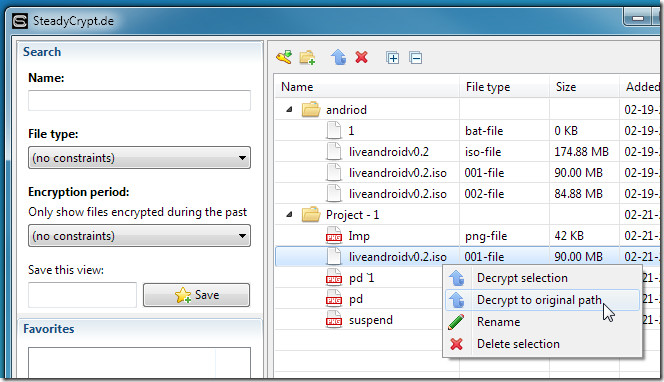
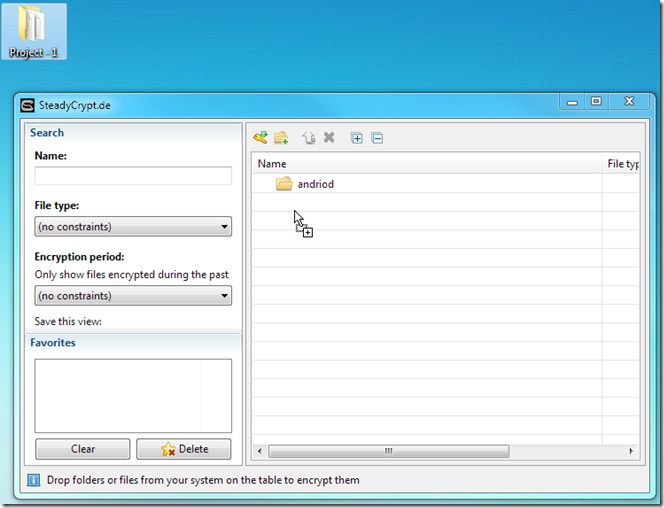
SteadyCrypt is a free file encryption tool for Windows that allows users to quickly and easily encrypt confidential files. The software is designed to be simple and intuitive, featuring a clean interface and drag-and-drop functionality. Its primary purpose is to secure your files with a master password, making them unreadable to anyone who doesn’t have the key.
The software creates encrypted “containers” that are protected by a master password. These containers act as secure vaults where you can store any type of file, from documents and images to videos and executable files. Once encrypted, the files cannot be accessed or used without the correct master password.
Key Features of SteadyCrypt
Quick and Easy Encryption
The software is built for speed and simplicity.
- Drag and Drop: You can encrypt files by simply dragging and dropping them onto the SteadyCrypt interface.
- Fast Processing: The encryption process is designed to be quick and efficient.
Secure Encrypted Containers
SteadyCrypt uses encrypted containers to store your files.
- Master Password Protection: Each container is secured with a master password that you set.
- Prevents Unauthorized Usage: Once secured, the files within the container cannot be accessed, read, or modified without the correct password.
Simple User Interface
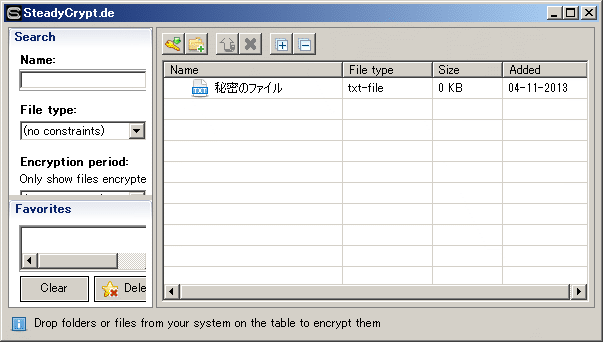
The application features a clean, straightforward interface that makes it accessible to users of all technical levels.
User Feedback: A Closer Look
What Users Like
- Simplicity: Users appreciate the straightforward interface and drag-and-drop functionality.
- Quick Encryption: The ability to encrypt files quickly is a major advantage.
Common Criticism
- Master Password Entry: A user review points out that a master password is required after installation, which could be considered a minor inconvenience by some.
Who Is SteadyCrypt For?
- Home Users: For protecting personal documents, financial records, and private photos.
- Small Business Owners: For securing sensitive business files.
- Students: For protecting personal and academic documents.
Frequently Asked Questions (FAQs)
1. Is SteadyCrypt free to use?
Yes, SteadyCrypt is a free application.
2. What is an encrypted container?
An encrypted container is a secure file that acts like a virtual vault. All files you place inside it are encrypted and protected by a master password.
3. How do I encrypt a file?
You can encrypt a file by simply dragging and dropping it onto the SteadyCrypt interface.
4. What happens if I forget my master password?
If you forget your master password, you will not be able to access the files in the container. There is no password recovery option, so it is crucial to remember your password or store it securely.
5. Is SteadyCrypt safe to use?
SteadyCrypt is a legitimate file encryption tool. However, as with any security software, you should download it only from a trusted source.
Conclusion: A Simple Solution for File Security
SteadyCrypt offers a simple and effective solution for encrypting confidential files on Windows. Its drag-and-drop functionality and straightforward interface make it an accessible tool for users who want to secure their data without navigating complex menus. While it may lack some of the advanced features of more expensive security suites, it excels at its core mission: providing quick and easy file encryption. For any user looking for a no-fuss way to protect their sensitive files, SteadyCrypt is a reliable and practical choice.