Introduction
In the modern digital landscape, the ability to manage computers remotely is not merely a convenience—it is an absolute necessity. Whether you are an IT administrator responsible for a hundred servers spread across the globe, a small business owner providing technical support to clients, or a telecommuter needing to access files and applications on your office PC from home, the right remote access software is the backbone of your productivity.
For over two decades, one name has stood out in the realm of Windows-based remote administration: Radmin. Short for “Remote Administrator,” Radmin is a robust, high-performance remote control and administration tool that has earned a reputation for being incredibly fast, extremely secure, and remarkably reliable. Since its inception, it has been a trusted tool for IT professionals, system administrators, and power users alike.
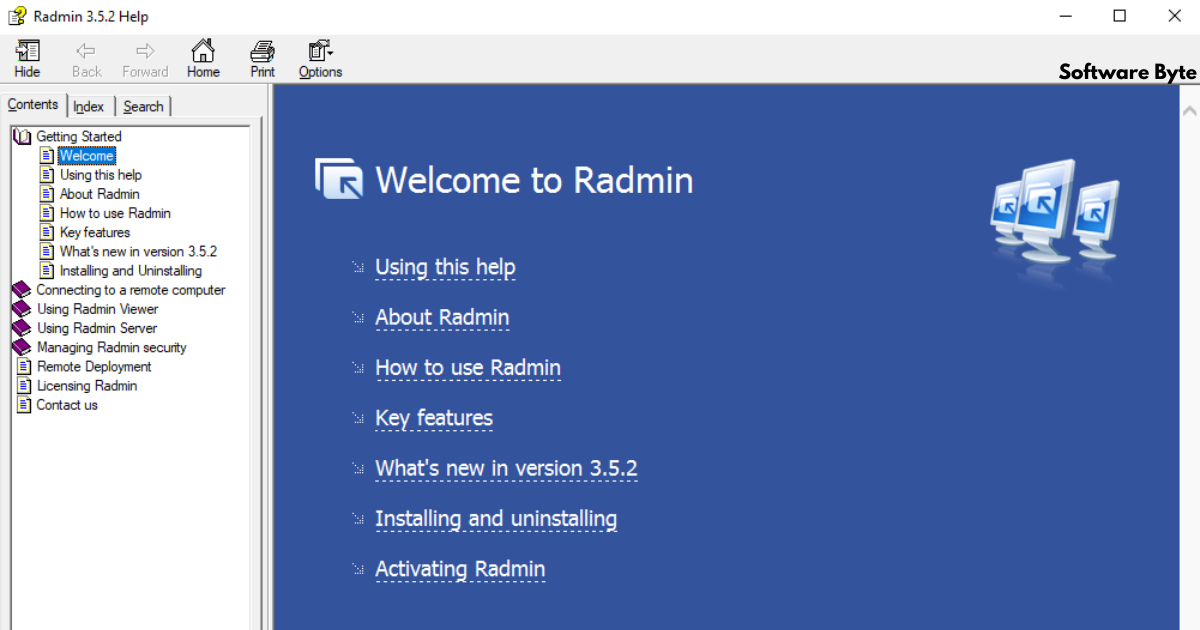
This article provides a comprehensive look at Radmin Server and Viewer. We will explore its core technology, its standout features, its security architecture, and what makes it a preferred choice over alternatives like VNC and RDP. We will also examine its system requirements, pricing model, and address common questions to help you determine if Radmin is the right solution for your remote administration needs.
What is Radmin?
The Core Components: Server and Viewer
At its core, Radmin operates on a classic server-client architecture, consisting of two primary components that work in tandem.
- Radmin Server: This is the software that you install on the computer you wish to control remotely. It runs as a background service, listening for incoming connection requests. Once installed and configured, the server component allows a remote user to access the host machine’s desktop, files, and applications as if they were physically sitting in front of it.
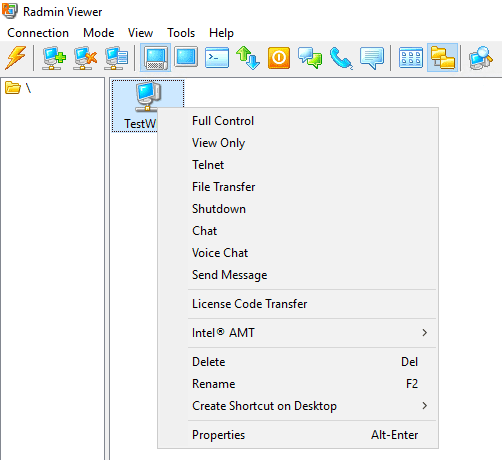
- Radmin Viewer: This is the client application that you run on your local machine to initiate a connection. The Viewer provides the interface through which you interact with the remote computer. It displays the remote desktop in a resizable window, enables file transfers, and provides access to advanced features like remote chat and command-line execution.
A History of Excellence
Radmin has been a staple in the Windows remote administration toolkit for many years. Its development has been guided by a commitment to performance and security. The software has evolved significantly since its early days, but its core philosophy remains unchanged: to provide the fastest, most secure, and most reliable remote control experience possible.
A notable milestone in its history was the release of version 3.0, which introduced the revolutionary DirectScreenTransfer™ technology. This proprietary innovation was a game-changer, dramatically reducing the CPU usage required for screen updates and increasing the speed of remote interactions. Over the years, Radmin has continued to refine its technology, adding support for modern operating systems and incorporating advanced security features like 256-bit AES encryption.
Who Uses Radmin?
Radmin’s user base is diverse, ranging from large enterprises to individual tech enthusiasts. Its primary applications include:
- IT Helpdesk and Support: Technicians can use Radmin to remotely connect to user workstations to troubleshoot issues, install software, and resolve technical problems without making an on-site visit.
- Server Management: Administrators can manage Windows servers from anywhere, performing critical tasks like monitoring system health, configuring services, and applying updates.
- Telecommuting and Remote Work: Employees can access their office computers from home or on the road, gaining secure access to files, applications, and internal network resources.
- Remote Collaboration: Colleagues can view each other’s screens for presentations, training, or collaborative work.
The Technology Behind Radmin’s Performance
DirectScreenTransfer Technology
The secret to Radmin’s legendary speed lies in its proprietary DirectScreenTransfer technology. Traditional remote control software typically captures screen data from the video memory (the Video RAM or VRAM). This process is inherently slow and resource-intensive, as the CPU must wait for the GPU to render the screen before capturing and compressing the image.
Radmin takes a fundamentally different approach. Instead of reading the screen data from the VRAM, it receives the data directly from Windows before it ever reaches the video RAM. This subtle but critical difference provides two major advantages:
- Unprecedented Speed: By bypassing the GPU, Radmin can capture and transmit screen updates with virtually zero latency. This results in a remote desktop experience that feels incredibly snappy and responsive, even over slower network connections.
- Minimal CPU Usage: Because the data is read before it’s processed by the GPU, Radmin uses significantly less CPU power than competing solutions. This is particularly beneficial for servers, where conserving CPU cycles for critical applications is paramount, and for older machines with limited processing power.
This technology is why many users describe Radmin as “the fastest” remote control software they have ever used.
Intel AMT Support for Out-of-Band Management
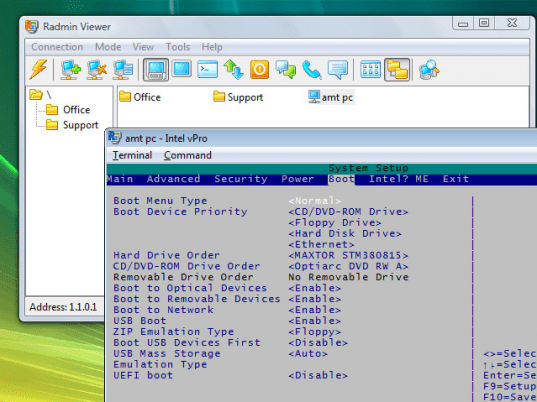
Radmin goes beyond simple remote control by integrating with Intel Active Management Technology (AMT) . This is a powerful feature that provides “out-of-band” management capabilities, which is crucial for enterprise IT environments.
Normally, if a remote computer is turned off, has a crashed operating system, or is experiencing hardware issues, standard remote control software is useless. However, Intel AMT is a hardware-based solution built into the chipset that operates independently of the operating system.
With Radmin’s support for Intel AMT, an administrator can perform a wide range of management tasks on a remote computer even when it is powered off or the OS is unresponsive. This capability is a lifesaver for enterprise IT teams, as it allows them to perform essential tasks without needing physical access to the machine.
- Power Control: You can turn the remote computer on, restart it, or shut it down.
- BIOS Management: You can view and change the BIOS settings of a remote system.
- Remote Boot: You can boot the remote computer from a local CD, DVD, or even a disk image file, which is incredibly useful for performing bare-metal recovery or installing new operating systems.
- Detailed Asset Information: You can access detailed asset information about the remote PC, allowing for proactive maintenance and inventory management.
This deep integration with Intel AMT makes Radmin a powerful tool for managing complex and distributed networks.
Performance and Resource Management
Radmin is engineered to be lightweight and efficient. The unique DirectScreenTransfer technology ensures that even when running on a modest machine, the software has a minimal impact on system performance. The speed and low CPU usage are consistently praised by users in their reviews, many of whom highlight how Radmin handles tasks that would cause other remote tools to stutter.
For instance, one user noted that Radmin allows them to watch small videos over a remote connection, which competitors “would never achieve.” Another user mentioned that the screens are so clear and responsive that they “sometimes found myself operating the PC I’m viewing from on the PC I’m viewing!”
Key Features and Capabilities
Full Remote Control
Radmin provides complete control over the remote computer’s keyboard and mouse. You can interact with the remote machine as if you were sitting in front of it, launching applications, managing files, and performing any administrative task. The experience is fluid and responsive, with minimal lag, thanks to the efficient screen capture and transfer technology.
File Transfer
Transferring files between the local and remote computers is an essential feature for any remote administration tool. Radmin includes a robust file transfer utility that allows you to easily drag and drop files and folders between machines. The transfer process is fast and secure, using the same 256-bit AES encryption as the main remote control session to protect your data in transit.
Command-Line Interface
For many IT professionals, a graphical interface is not always the fastest way to work. Radmin provides access to a remote command-line interface (CLI). This allows administrators to execute commands, run scripts, and perform batch operations on the remote machine with the speed and efficiency that only a command-line environment can provide.
Multi-User Access
Radmin supports multiple concurrent connections to a single server. This means that several administrators can connect to a remote computer simultaneously to collaborate on a task or for training purposes.
Security Features
Radmin is renowned for its robust security architecture. It provides multiple layers of protection to safeguard your remote connections and data.
- 256-bit AES Data Encryption: All data transmitted between the Radmin Server and Viewer is encrypted using the industry-standard 256-bit Advanced Encryption Standard (AES) . This ensures that no one can intercept and decipher your remote session.
- Flexible Security Options: Radmin offers a choice between two distinct security systems:
- Windows Security: This integrates with Windows’ built-in security infrastructure, allowing you to use Windows user accounts and Kerberos/NTLM authentication.
- Radmin Security: This is a dedicated security system that includes its own user database and supports strong encryption algorithms like Diffie-Hellman (2048-bit) for key exchange.
- Robust Access Control: You have granular control over who can connect to a Radmin server. You can create individual user accounts with specific permissions. You can also use special IP-filter tables to restrict access to specific IP addresses or sub-networks, effectively creating a whitelist of trusted locations.
Advanced Features and Utilities
Beyond the core remote control and file transfer, Radmin offers several useful utilities:
- Text Chat: You can communicate with the user of the remote computer (if someone is sitting at it) via a built-in text chat.
- Voice Chat: For real-time collaboration and communication, Radmin includes a voice chat feature, enabling you to talk to the remote user as if you were on a phone call.
- Message Sending: You can send text messages to the remote computer, which will appear as a pop-up window on the host machine’s screen.
- Screen Capture: You can capture screenshots of the remote computer’s screen directly from the Viewer.
Radmin vs. Competitors: A Comparison
The remote access software market is crowded, with options like Remote Desktop (RDP), Virtual Network Computing (VNC), and newer cloud-based solutions like TeamViewer and AnyDesk. How does Radmin stack up?
Radmin vs. Remote Desktop Protocol (RDP)
RDP is the built-in remote control solution for Windows. It’s free, well-integrated, and does a decent job. However, Radmin offers several advantages:
- Network Agnosticism: RDP relies heavily on certain network configurations (like port 3389), which can be problematic over the internet or through firewalls. Radmin is more flexible and easier to configure for use over a WAN or the internet.
- Performance: While RDP can be fast, many users report that Radmin is significantly faster and more responsive, especially over lower-bandwidth connections. The DirectScreenTransfer technology gives Radmin a clear edge.
- Management Features: Radmin’s support for Intel AMT and its comprehensive management toolset far surpasses the basic remote control capabilities of RDP.
- Multi-Platform Viewer: Radmin provides a dedicated viewer application that offers more features and a more consistent experience than the RDP client.
Radmin vs. VNC (Virtual Network Computing)
VNC is a popular open-source remote control protocol. However, it is often less efficient and less secure than Radmin.
- Speed: Radmin is significantly faster than most VNC implementations. The efficiency of the screen capture and data transfer is a major differentiator.
- Security: Radmin’s built-in encryption and comprehensive security model are more robust than VNC, where encryption is often an afterthought or a third-party add-on.
- Ease of Use: For beginners, setting up a VNC connection can be complex due to the many different versions and configurations. Radmin, on the other hand, is straightforward to set up and use.
Radmin vs. TeamViewer/AnyDesk
TeamViewer and AnyDesk are modern, cloud-based remote access tools designed for ease of use. They are excellent for ad-hoc support and consumer use, but Radmin is a more powerful choice for professional and enterprise network administration.
- Cost: TeamViewer’s licensing can become expensive for commercial use, especially for a large fleet of machines. Radmin offers a more flexible and often more affordable licensing model for businesses.
- Performance: While modern tools like AnyDesk are fast, they often rely on cloud servers to broker connections. Radmin offers direct, peer-to-peer connections that can provide lower latency and higher speeds, especially within a local network.
- Security and Control: With Radmin, you have complete control over your infrastructure. You are not relying on a third-party cloud service or exposing your data to external servers. The robust security and access controls are more suitable for enterprises with strict security policies.
User Reviews and Feedback
The overwhelmingly positive user feedback for Radmin is a strong testament to its quality and reliability. With over 1.7 million downloads and an average user rating of 4.2 out of 5 stars, it is clear that Radmin has a loyal and satisfied user base.
Common Praises
- Speed and Responsiveness: Users consistently highlight Radmin’s speed as its best feature. One long-time user stated, “Radmin basically gives you total control with very little lag on all of the desktops in your home environment.”
- Ease of Installation: Many users note that Radmin is surprisingly easy to set up. One reviewer shared, “I had tried a couple of others like VNC Free and for a rookie like me, I it was too confusing. Then I tried RADmin and BOOM it worked.”
- Reliability: Radmin is frequently described as “very reliable” and “flawless” by administrators who depend on it for critical tasks.
- Comprehensive Features: Users appreciate the breadth of features, from remote control and file transfer to the voice chat and command-line capabilities.
Constructive Criticism
While the praise is abundant, some users have raised a few valid concerns:
- Cost: The most common criticism is the cost. Radmin is a paid professional tool, and its pricing model is aimed at businesses. One reviewer noted, “License pricing aimed at businesses & not consumer friendly.” However, many also acknowledge that the price is justified given the performance and features.
- User Interface: Some users consider the interface to be a bit dated or “basic.” It is functional and efficient but lacks the modern, flashy UI of some newer applications.
- Firewall/Port Forwarding: Setting up Radmin over the internet often requires configuring port forwarding on the router and dealing with dynamic DNS, which can be a hurdle for less technical users.
- Customer Support: A few users have reported issues with customer support responsiveness.
FAQs About Radmin Server and Viewer
1. What are the system requirements for Radmin Server and Viewer?
Answer: Radmin is specifically designed for Windows operating systems. The latest version officially supports Windows 11 and is also compatible with Windows 10, Windows 8, Windows 7, and Windows Server editions. A 32-bit or 64-bit version of Windows is required. The software is lightweight and has modest hardware requirements, typically running well on any machine that can run the supported operating system.
2. Is Radmin secure to use over the internet?
Answer: Yes, Radmin is highly secure and is designed for safe use over the internet or any public network. It employs robust, industry-standard security measures, including 256-bit AES encryption for all data transmitted between the client and server. It also offers advanced security options like NTLM/Kerberos authentication and IP filtering to restrict access to trusted addresses only.
3. Can I transfer files between computers using Radmin?
Answer: Yes, Radmin includes a powerful and easy-to-use file transfer utility. You can launch the file transfer tool from the Viewer and then drag and drop files and folders between your local machine and the remote computer. The file transfer is fast and fully encrypted for security.
4. How does Radmin compare to free tools like VNC or RDP?
Answer: While free tools like VNC and RDP are capable, Radmin offers superior performance, stronger security, and a richer feature set. Radmin is notably faster and more responsive due to its proprietary DirectScreenTransfer technology. Its security architecture with 256-bit AES encryption is often more robust than VNC’s options. It also provides advanced management features like Intel AMT support, which is not available in standard RDP or VNC.
5. What is Radmin’s licensing model?
Answer: Radmin uses a per-user or per-administrator licensing model. This means you purchase a license for the number of system administrators who will be using the Radmin Viewer to connect to servers. The Radmin Server software can be installed on an unlimited number of computers without requiring additional licenses, making it a scalable solution for businesses. This model is different from per-device licensing used by some competitors.
Conclusion
Radmin Server and Viewer has earned its place as a premier remote administration solution for Windows. Its combination of blazing-fast speed, military-grade security, and rock-solid reliability makes it a trusted tool for IT professionals across the globe. By leveraging proprietary technologies like DirectScreenTransfer and integrating with enterprise-grade features like Intel AMT, Radmin provides a level of performance and control that few competitors can match.
While it comes at a cost and its interface may not be the most modern, the software’s value is undeniable. For network administrators, helpdesk teams, and power users who require fast, secure, and dependable remote access, Radmin remains a top-tier choice. Its enduring popularity, evidenced by millions of downloads and glowing user reviews, is a testament to its enduring quality and its ability to solve the fundamental challenges of remote computer management. If you are in search of a professional remote administration tool that prioritizes speed and security, Radmin is certainly a solution worth investing in.