In the world of web development and hosting, having a reliable and secure local server environment is essential. For Windows users, WAMP (Windows, Apache, MySQL, PHP) stacks provide a powerful platform for developing, testing, and hosting web applications. However, configuring and securing these components can be a challenging task, especially for those new to server administration. This is where specialized solutions like SecureWAMP come into play. This article explores the concept of a WAMP stack, the importance of security, and how a tool like SecureWAMP simplifies the process of setting up and managing a secure web server environment on Windows.
Understanding the WAMP Stack
Before diving into SecureWAMP, it’s important to understand the components that make up a WAMP stack. WAMP is an acronym that stands for Windows, Apache, MySQL, and PHP. These four pieces of software work together to form a complete web server environment.
What is a WAMP Stack?
A WAMP stack is a collection of open-source software that, when installed on a Windows operating system, provides a fully functional web server environment. Each component plays a vital role:
- Windows: The underlying operating system.
- Apache: The web server software responsible for handling HTTP requests and serving web pages.
- MySQL: A relational database management system used to store and manage data for dynamic websites and applications.
- PHP: A server-side scripting language used to create dynamic web pages and applications.
Why Use a WAMP Stack?
WAMP stacks are incredibly popular for several reasons:
- Local Development: They allow developers to build and test websites and applications on their own Windows machines before deploying them to a live server.
- Cost-Effective: All components are free and open-source, making it an affordable solution for individuals and small businesses.
- Learning Platform: They provide an ideal environment for learning web development technologies like PHP and MySQL.
- Testing Environment: They offer a safe sandbox to test new features, updates, and security patches without affecting a live production site.
The Challenge of Configuration and Security
While a WAMP stack offers a powerful platform, setting it up correctly and securing it can be daunting. Apache, MySQL, and PHP each have numerous configuration options that must be properly tuned for performance and security. Default settings are often not secure enough for a production environment and may even have vulnerabilities. This is where tools like SecureWAMP become extremely valuable.
Introducing SecureWAMP
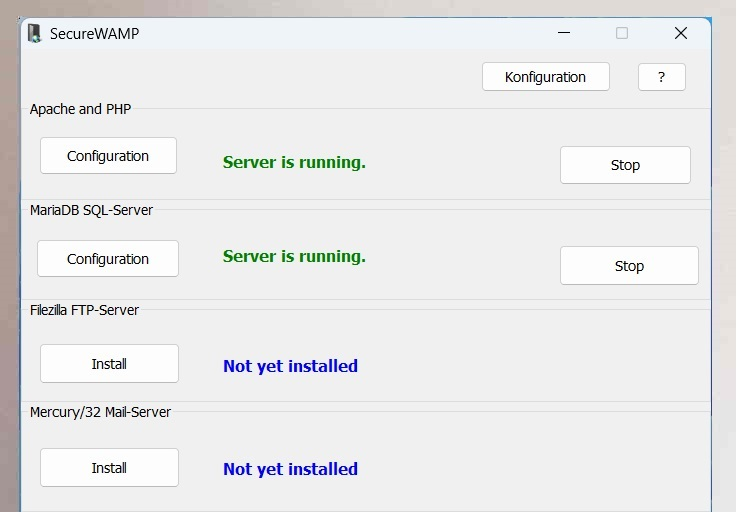
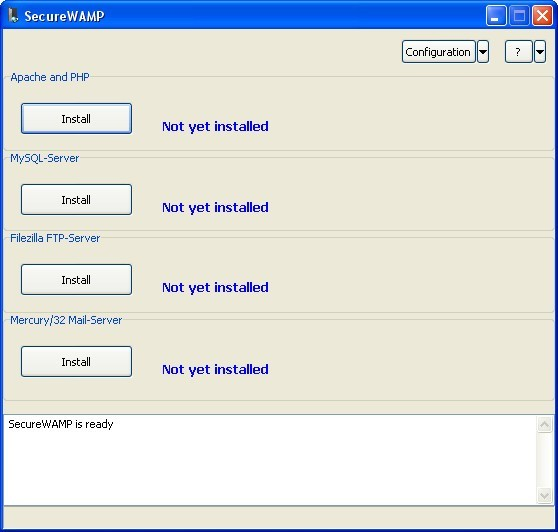
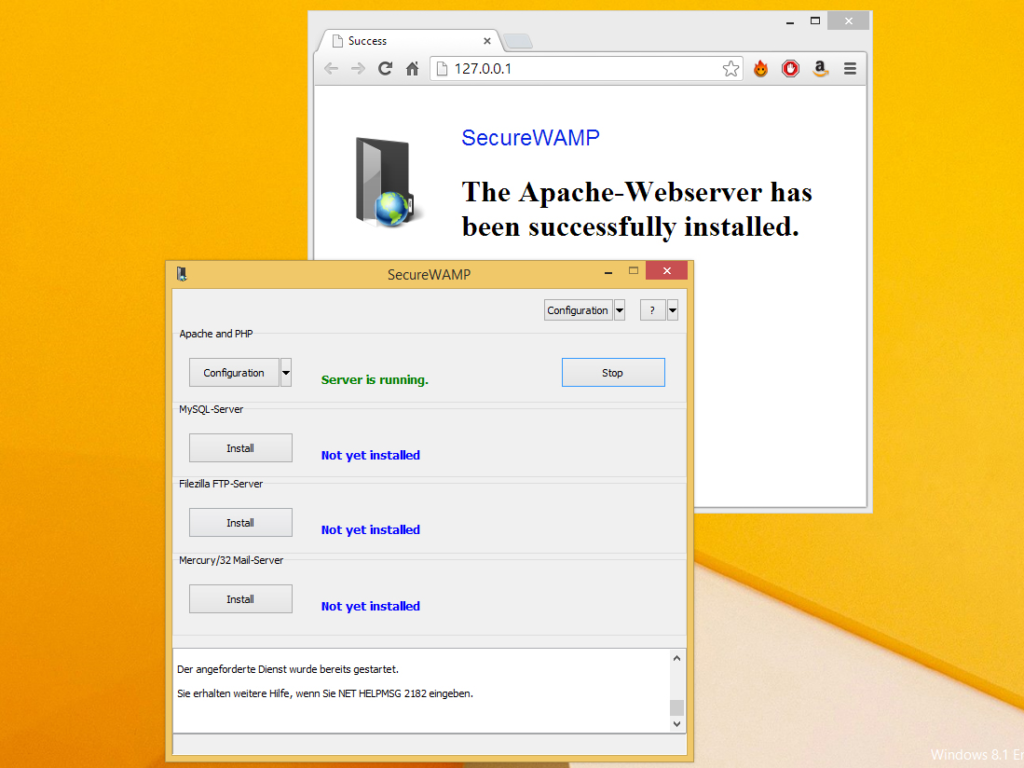
SecureWAMP is a software package designed to simplify the installation and management of a WAMP server on Windows. It provides a complete, pre-configured web server environment that includes not only the core components but also additional tools like phpMyAdmin, a popular database management interface. What sets SecureWAMP apart is its focus on security and ease of use through a graphical user interface.
Key Features of SecureWAMP
SecureWAMP aims to make setting up and running a secure WAMP server accessible to everyone, from beginners to experienced developers.
1. Quick and Easy Setup
The primary advantage of SecureWAMP is its ability to provide a quick system setup. Instead of manually downloading, installing, and configuring Apache, MySQL, and PHP separately, SecureWAMP packages them all together in a single, streamlined installer. This eliminates compatibility issues and saves significant time.
2. Complete GUI Administration
One of the standout features is that SecureWAMP is completely administered via a graphical user interface (GUI). While many WAMP stacks rely on manual editing of configuration files (like httpd.conf, php.ini, and my.ini), SecureWAMP provides a user-friendly interface to manage these settings. This makes it much easier for users who are less familiar with command-line tools or configuration syntax to manage their server.
3. Support for Developer and Production Settings
SecureWAMP is designed to be flexible enough to support different environments. It includes configurations for both developer and production settings.
- Developer Mode: In this mode, the software is configured with settings that are helpful for development, such as detailed error reporting and debugging tools enabled.
- Production Mode: In this mode, settings are optimized for performance and security on a live server, with error reporting turned off and security measures tightened. This dual-mode capability allows administrators to easily switch between a development and a production-ready environment.
4. Ideal for Web Hosting Environments
The software is described as being ideal for web hosting environments. This suggests it is designed to handle the demands of hosting multiple websites and applications reliably, with a focus on maintaining security and performance.
5. User-Friendly Interface
A consistent theme in SecureWAMP’s design is a user-friendly interface that simplifies configuration. This means that tasks like enabling/disabling PHP extensions, configuring virtual hosts, or tweaking security settings can be done through a graphical panel rather than by editing text files.
Specifics of SecureWAMP
- Version: The version available was 0.90.
- Operating Systems: It was compatible with a range of Windows operating systems, including Windows XP, Vista, Windows 7, and Windows 10.
- Popularity: While it may not have been the most widely used WAMP stack, it served a specific niche of users looking for an easy-to-use and security-focused solution.
The Importance of Security in a WAMP Stack
SecureWAMP’s name highlights its emphasis on security, which is a critical aspect of any web server, whether local or live.
Common Security Risks
A misconfigured WAMP stack can be vulnerable to various threats:
- SQL Injection: Attackers can manipulate database queries if input validation is weak.
- Cross-Site Scripting (XSS): Malicious scripts can be injected into web pages.
- Remote File Inclusion: Attackers can include remote files on the server.
- Directory Traversal: Attackers can access files outside the web root directory.
- Default Credentials: Leaving default usernames and passwords for databases or admin panels is a major risk.
How SecureWAMP Addresses Security
While the exact security measures built into SecureWAMP may vary by version, a tool with this focus typically includes features to mitigate these risks:
- Secure Defaults: The software likely includes pre-configured settings that are more secure than the default installations of Apache, MySQL, and PHP.
- Production Mode: This mode would likely disable features like error display to prevent information disclosure and implement stricter security policies.
- Easy Access Control: The GUI would make it easier to set up user authentication and permissions correctly.
- Updated Components: It would likely include the latest stable versions of its components, which include patches for known security vulnerabilities.
Practical Applications and Use Cases
SecureWAMP is a versatile tool that can be used in various scenarios.
For Web Developers
Developers can use SecureWAMP to create a local development environment that mirrors a production server. The ability to easily switch between developer and production settings is particularly useful here. They can build and test their applications locally with developer features enabled, and then test how the application behaves in a production-like environment before deployment.
For Small Businesses
Small businesses that want to host their own website internally or on a virtual private server (VPS) could use SecureWAMP. Its user-friendly interface reduces the need for a full-time IT administrator, as it simplifies the management of the web server, databases, and security settings.
For Educational Purposes
Teachers and students in web development courses can use SecureWAMP to set up a learning environment. Its ease of setup and management means students can focus on learning PHP and MySQL rather than getting bogged down in complex server configuration.
For Legacy System Support
Because it was compatible with older Windows versions like XP and Vista, SecureWAMP could be useful for maintaining and testing websites that are designed to run on legacy systems.
Frequently Asked Questions (FAQs)
1. What is a WAMP stack and why would I need it?
A WAMP stack is a bundle of software: Windows (operating system), Apache (web server), MySQL (database), and PHP (scripting language). It creates a complete web server environment on your Windows computer. You need it to develop and test dynamic websites and web applications locally on your machine before deploying them to a live server.
2. Is SecureWAMP free to use?
Yes, SecureWAMP was offered as a free software download. It is an open-source or freeware utility, making it an accessible option for developers, small businesses, and hobbyists.
3. What are the main advantages of using SecureWAMP over setting up Apache, MySQL, and PHP manually?
SecureWAMP offers a quick and easy setup by bundling all components together, eliminating compatibility issues. It is completely administered via a GUI, so you don’t have to manually edit complex configuration files. It also includes pre-configured developer and production settings, making it easier to switch between environments.
4. What specific security features does SecureWAMP provide?
While detailed security features are not explicitly listed on the download page, the software is designed with a focus on security. It likely provides a Production Mode with security-optimized settings (e.g., turned-off error reporting), and it uses secure defaults for Apache, MySQL, and PHP configurations. This helps protect against common vulnerabilities like SQL injection and cross-site scripting.
5. What Windows versions are compatible with SecureWAMP?
Based on the specifications, SecureWAMP was compatible with a range of Windows operating systems. This includes Windows XP, Windows Vista, Windows 7, and Windows 10. Please note that as a legacy tool, it may not be fully compatible with newer versions like Windows 11.
Conclusion
SecureWAMP represented a valuable tool in the web development ecosystem for Windows users. It successfully addressed a significant challenge: the need for a secure and easily manageable WAMP server environment. By bundling Apache, MySQL, and PHP with a focus on security and providing a user-friendly graphical interface, it made powerful server technology accessible to a wider audience. The ability to switch between developer and production modes added to its flexibility, making it suitable for both local testing and live web hosting scenarios.
While the world of web development has evolved, and newer tools and stacks have emerged, the core principles that SecureWAMP championed—security, ease of use, and streamlined setup—remain essential. For anyone working with a legacy Windows system or looking for a simple introduction to managing a secure web server, the concepts behind SecureWAMP continue to offer valuable lessons. Understanding the importance of a secure WAMP environment is a foundational skill for any web developer or system administrator.