In today’s digital landscape, email remains the backbone of business communication. For developers building applications that need to handle email functionality, having a robust and reliable tool is essential. Whether you’re creating a CRM system, automating marketing campaigns, or developing a custom email management solution, integrating email capabilities into your .NET applications can be challenging without the right library.
Enter Aspose.Email for .NET – a powerful, comprehensive API designed to simplify email processing, manipulation, and management within the .NET ecosystem. Unlike many solutions that require Microsoft Outlook to be installed on the server, this library operates independently, making it ideal for server-side applications, web services, and automated workflows.
This article serves as your complete guide to understanding and leveraging Aspose.Email for .NET. We’ll explore its features, capabilities, and practical applications to help you decide if this is the right solution for your development needs.
What is Aspose.Email for .NET?
Aspose.Email for .NET is a sophisticated class library that enables developers to create, manipulate, convert, and transmit email messages programmatically. It provides a comprehensive set of APIs that handle everything from basic email creation to complex operations like mail merge, iCalendar generation, and integration with various email protocols and services.
The library is built on a flexible architecture that supports a wide range of email formats, including Personal Storage Files (PST), Offline Storage Files (OST), EML, MSG, and MHT files . This versatility makes it an invaluable tool for developers who need to work with different email systems and file types without relying on external email clients.
Key aspects of the API include:
- Independence from Microsoft Outlook: The library works seamlessly without requiring Outlook installation on the server or development machine. This is a significant advantage for server-side applications where installing Outlook is often not feasible or permitted.
- Cross-platform compatibility: Aspose.Email for .NET can be used across different versions of the .NET Framework, as well as .NET Core and .NET 5/6/7/8, making it suitable for a wide range of application types.
- Extensive protocol support: The library provides built-in support for major email protocols, enabling direct communication with email servers.
Core Features and Capabilities
Aspose.Email for .NET offers a comprehensive set of features that address virtually every aspect of email processing in .NET applications.
1. Format Support and Conversion
The library supports a broad spectrum of email formats:
- Microsoft Outlook formats: MSG, PST, OST, OFT
- Standard email formats: EML, EMLX, MBOX
- Other formats: ICS (iCalendar), VCF (vCard), HTML, MHTML
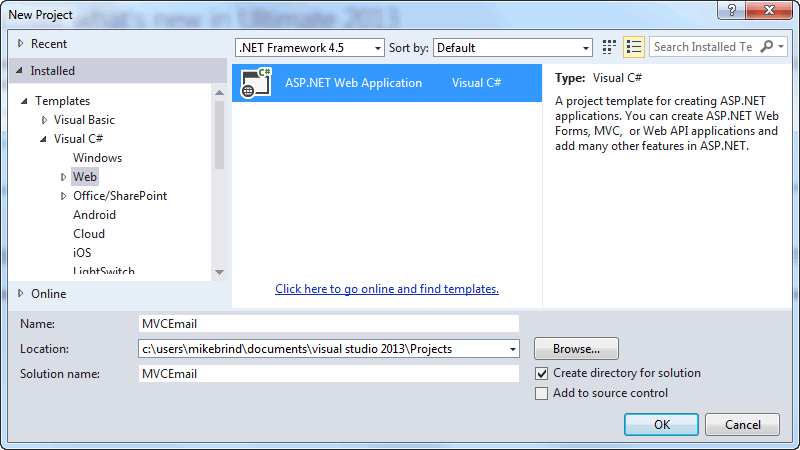
This extensive format support enables developers to read, write, and convert between these formats with high fidelity. For instance, converting EML files to MSG format for Outlook compatibility becomes a straightforward operation using the library’s API .
2. Protocol Support and Server Integration
Aspose.Email for .NET provides robust support for all major email protocols :
| Protocol | Description |
|---|---|
| SMTP | Send emails using the Simple Mail Transfer Protocol with SSL/TLS encryption support |
| POP3 | Retrieve emails from POP3 servers, read message headers, and download complete messages |
| IMAP | Perform advanced mailbox operations including folder management, message searching, and synchronization; supports IMAP IDLE for real-time notifications |
| EWS | Connect to Microsoft Exchange Server via Exchange Web Services for comprehensive mailbox access |
| MAPI | Interact with messaging systems like Microsoft Exchange using MAPI-based protocols |
3. Mail Merge Functionality
The library includes sophisticated mail merge capabilities that allow developers to create personalized emails by merging data from various sources. This is particularly useful for marketing campaigns, customer communications, and automated notification systems where each recipient needs to receive a customized message .
4. iCalendar Support
Aspose.Email for .NET provides comprehensive support for iCalendar (RFC 2445) recurrence patterns and calendar events. Developers can create and consume iCalendar-compliant appointments, making it easy to integrate calendar functionality into applications that schedule meetings, events, or reminders .
5. Advanced Email Analysis
The library offers tools for advanced email analysis, including:
- Spam detection: Using Bayesian filtering and other algorithms to identify and classify spam messages
- Email validation: Verify email addresses, syntax, domains, and MX records
- Content extraction: Extract and analyze email content for compliance and auditing purposes
Getting Started with Aspose.Email for .NET
Installation
Installing Aspose.Email for .NET in your project is straightforward using NuGet, the package manager for .NET. Here are the methods you can use :
Using .NET CLI:
dotnet add package Aspose.EmailUsing Package Manager Console:
Install-Package Aspose.EmailUsing NuGet Package Manager UI:
Search for “Aspose.Email” in the NuGet Package Manager and install the latest version.
Basic Setup and License
Aspose.Email requires a license to unlock all features and remove evaluation limitations. However, you can start with a free trial to explore its capabilities.
Evaluation Version Limitations:
The trial version provides almost full functionality but includes certain limitations :
- A “License.txt” file is added to saved message files
- Only 50 emails can be extracted from a PST folder
- Only 3 attachments and inline images can be extracted from an MSG file
- The subject line adds “Evaluation Message” when saving in certain formats
- An evaluation watermark is added when saving to XPS or TIFF formats
Setting a License:
Once you purchase a license, applying it requires just a few lines of code:
Aspose.Email.License license = new Aspose.Email.License();
license.SetLicense("Path_to_your_license.lic");
Creating Your First Email Message
Creating an email with Aspose.Email for .NET is remarkably simple. The MailMessage class serves as the core component for constructing email messages .
using Aspose.Email.Mime;

// Create a new mail message
MailMessage message = new MailMessage();

// Set basic properties
message.Subject = "Welcome to Aspose.Email for .NET";
message.HtmlBody = "<b>Hello!</b> This is your first email created with Aspose.Email.";
message.From = new MailAddress("sender@company.com", "Sender Name");

// Add recipients
message.To.Add(new MailAddress("recipient@example.com", "Recipient Name"));

// Save the message
message.Save("welcome_email.eml", SaveOptions.DefaultEml);
This example demonstrates how to create a fully functional email with HTML formatting, making it suitable for both plain text and rich HTML content.
Practical Applications and Use Cases
1. Email Automation and Bulk Sending
Aspose.Email for .NET is an excellent choice for automating email dispatch in enterprise applications. Whether you need to send transactional emails, system notifications, or marketing communications, the library can handle both individual and bulk messages efficiently .
Sample Scenario: A banking application needs to send monthly statements to thousands of customers. Using Aspose.Email for .NET, developers can:
- Generate personalized emails with customer-specific data
- Attach PDF statements or other documents
- Send messages through SMTP with proper authentication and encryption
- Log delivery status and handle errors gracefully
2. CRM and Contact Management Integration
In CRM systems, email communication is critical for managing customer relationships. Aspose.Email for .NET enables seamless integration by allowing developers to :
- Extract email content from forwarded messages
- Parse and store email metadata (subject, sender, recipients)
- Process email attachments and inline images
- Integrate with Microsoft Dynamics CRM or other platforms for comprehensive case and contact management
3. Email Migration and Conversion
Organizations often need to migrate email data between systems or convert email files to different formats for compliance, archival, or compatibility reasons. Aspose.Email for .NET provides the tools to accomplish these tasks:
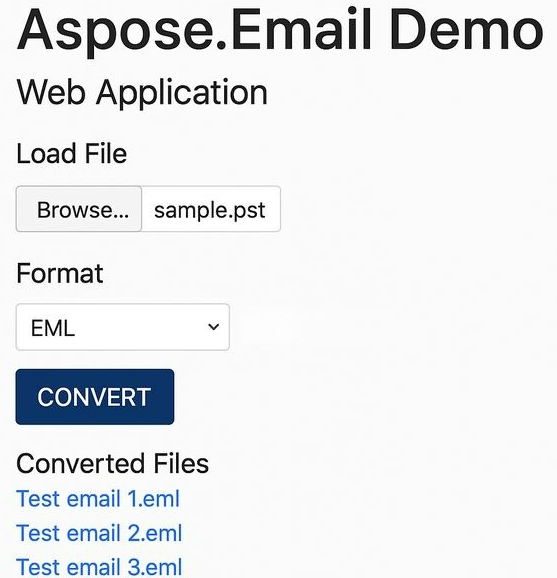
- Convert PST files to EML, MSG, or MHTML format
- Extract emails from mailbox archives for importing into other systems
- Standardize email formats across different departments or platforms
4. Email Archiving and Document Management
Legal and regulatory requirements often mandate that organizations maintain email archives. Aspose.Email for .NET can be integrated into document management systems to:
- Extract email content and attachments for archival storage
- Convert emails to MHTML format, which encapsulates all resources in a single file
- Index email properties for search and retrieval
- Manage PST and OST storage files programmatically
Advanced Features
HTML and Rich Content Support
Modern email applications require rich HTML content. Aspose.Email for .NET makes it easy to create visually appealing emails with formatting, images, links, and embedded resources :
message.HtmlBody = @"
    <html>
        <body>
            <h1>Welcome!</h1>
            <p><b>Thank you</b> for joining our service.</p>
            <img src='cid:logo.jpg' />
        </body>
    </html>";
The library supports embedding images and resources directly within the email, ensuring a consistent appearance regardless of the recipient’s email client.
Attachments and Custom Headers
Handling file attachments and custom headers is straightforward with Aspose.Email for .NET :
// Add an attachment
message.Attachments.Add(new Attachment("report.pdf"));

// Add custom headers
message.Headers.Add("X-Custom-ID", "12345");
message.Headers.Add("X-Priority", "High");
Exchange Server Integration
For organizations using Microsoft Exchange Server, Aspose.Email for .NET provides comprehensive integration through Exchange Web Services :
using Aspose.Email.Exchange;

// Connect to Exchange server
ExchangeClient client = new ExchangeClient(
    "https://exchange.company.com/ews/Exchange.asmx",
    "username",
    "password",
    "domain");

// List messages in the Inbox
ExchangeMessageInfoCollection messages = client.ListMessages(
    client.GetMailboxInfo().InboxUri);

// Fetch complete message details
foreach (ExchangeMessageInfo info in messages)
{
    MailMessage msg = client.FetchMessage(info.UniqueUri);
    // Process the message
}
This capability allows applications to interact directly with Exchange mailboxes, accessing emails, folders, and calendar items programmatically.
Performance Considerations
When implementing Aspose.Email for .NET in production applications, consider the following best practices to optimize performance:
Memory Management
Proper memory management is crucial, especially when processing large volumes of emails:
- Use
usingstatements to dispose of streams and resources properly - For large attachments, process them in chunks rather than loading entirely into memory
- Consider using memory streams instead of file streams when appropriate
Batch Processing
When dealing with multiple emails:
- Process emails in batches rather than individually to reduce overhead
- Use asynchronous methods when available to improve responsiveness
- Implement proper error handling to avoid processing interruptions
Efficient Data Handling
- Minimize the size of HTML content by optimizing images and code
- When converting large PST files, consider processing folder by folder
- Use appropriate save options to avoid unnecessary overhead
Integration with External Services
Aspose.Email for .NET can be integrated with various third-party email services, providing flexibility in choosing your email delivery platform :
Microsoft Graph
Integration with Microsoft Graph allows developers to access Microsoft 365 services, including Outlook, Exchange, and Teams. This enables:
- Unified access to mailbox data
- Sending and receiving emails
- Managing calendar events and contacts
Gmail API
The library simplifies integration with Gmail through OAuth 2.0 authentication, enabling:
- Reading and sending emails from Gmail accounts
- Managing folders and labels
- Searching and filtering emails
Mailgun and SendGrid
For email delivery services, Aspose.Email for .NET can compose and manage emails that are then sent through Mailgun or SendGrid APIs. This combination provides:
- Reliable email delivery
- Email tracking and analytics
- High-volume sending capabilities
Developer Community and Support
Aspose provides comprehensive documentation, tutorials, and community support for developers. The library is well-documented with extensive API references and code examples .
Tutorials and Learning Resources
Numerous tutorials are available covering various aspects of the library:
- Beginner tutorials: Creating and sending emails, format conversion basics
- Intermediate tutorials: Exchange integration, mail merge operations
- Advanced tutorials: Spam detection, performance optimization, complex conversions
Licensing Options
Aspose offers flexible licensing models :
- Free trial: Test the library with limited features
- Temporary license: 30-day full-featured evaluation
- Commercial license: Production use with full features and support
Real-World Implementation Example
To illustrate the practical application of Aspose.Email for .NET, consider this common scenario:
Requirement: An e-commerce platform needs to send order confirmations and shipping notifications to customers, with the ability to include order details, attachments, and tracking information.
Solution using Aspose.Email for .NET:
- Create email template with placeholders for customer-specific data
- Use mail merge to populate personalized content for each customer
- Attach order documents as PDF files
- Send through SMTP with proper authentication
- Log success/failure for audit and troubleshooting
This approach eliminates the need for Outlook on the server, scales to thousands of orders, and provides reliable email delivery with detailed logging capabilities.
Frequently Asked Questions
Q1: Does Aspose.Email for .NET require Microsoft Outlook to be installed?
No, Aspose.Email for .NET operates completely independently of Microsoft Outlook. This is one of its key advantages, as it allows you to process emails on servers without installing Outlook, which is often not permitted in production environments.
Q2: Can I use Aspose.Email for .NET with .NET Core or .NET 8?
Yes, Aspose.Email for .NET supports various .NET frameworks, including .NET Framework, .NET Core, and modern .NET versions. This provides flexibility for migrating or developing cross-platform applications .
Q3: What email formats does Aspose.Email for .NET support?
The library supports a wide range of formats, including Microsoft Outlook formats (MSG, PST, OST, OFT), standard email formats (EML, EMLX, MBOX), and other formats like ICS, VCF, HTML, and MHTML .
Q4: How does Aspose.Email for .NET handle attachments?
Aspose.Email provides comprehensive attachment handling, allowing developers to extract, add, and manipulate attachments programmatically. You can work with multiple attachments, inline images, and embedded objects .
Q5: Is there a free version or trial available?
Yes, Aspose offers a free trial version that provides almost all product functionality with some limitations, such as evaluation watermarks and restrictions on the number of items processed. You can also request a 30-day temporary license for full-featured testing .
Conclusion
Aspose.Email for .NET stands out as a comprehensive, reliable, and feature-rich solution for email processing in .NET applications. Its independence from Microsoft Outlook, extensive format and protocol support, and powerful features like mail merge and iCalendar integration make it invaluable for developers building email-enabled applications.
Whether you’re developing CRM systems, automating email workflows, migrating email archives, or building marketing automation platforms, Aspose.Email for .NET provides the tools and flexibility to meet your requirements. The library’s robust API, detailed documentation, and active community support ensure that you can implement complex email functionality efficiently and effectively.
By incorporating Aspose.Email for .NET into your development toolkit, you gain the ability to handle virtually any email processing task without the overhead and limitations of external email clients, making it a strategic choice for professional .NET development.