We have all been there. You click on a link to a news article, only to be greeted by a wall. Not a paywall, but a registration wall. The site demands you create an account, provide your email address, and hand over personal information just to read a single piece of content. It is frustrating, time-consuming, and often leads to a flood of spam. There must be a better way.
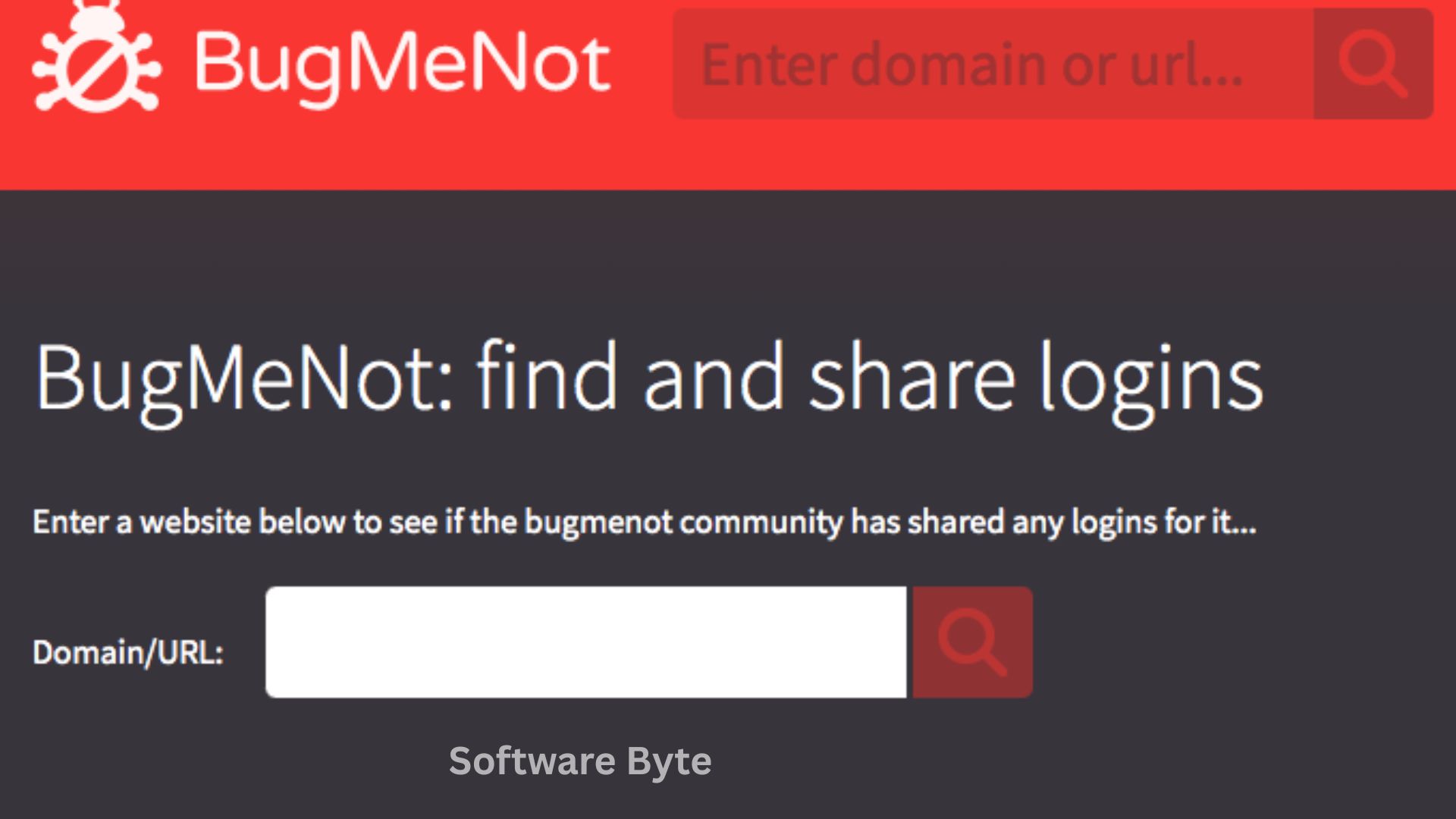
BugMeNot is a simple yet ingenious Firefox extension that offers a solution. It is a free tool designed to bypass these compulsory web registrations. Instead of entering your own information, BugMeNot automatically fills in login credentials from its database of shared, public accounts.
This lightweight add-on works best for those sites you visit only occasionally. You will not need to spend time registering at a newspaper site just to read one article. With a single right-click, BugMeNot simplifies the process, saving you time and protecting your privacy.
Software Overview
BugMeNot is a free browser extension specifically designed for Mozilla Firefox. Its purpose is to streamline access to websites that require free registration. The tool works by automating the login process using shared login data.
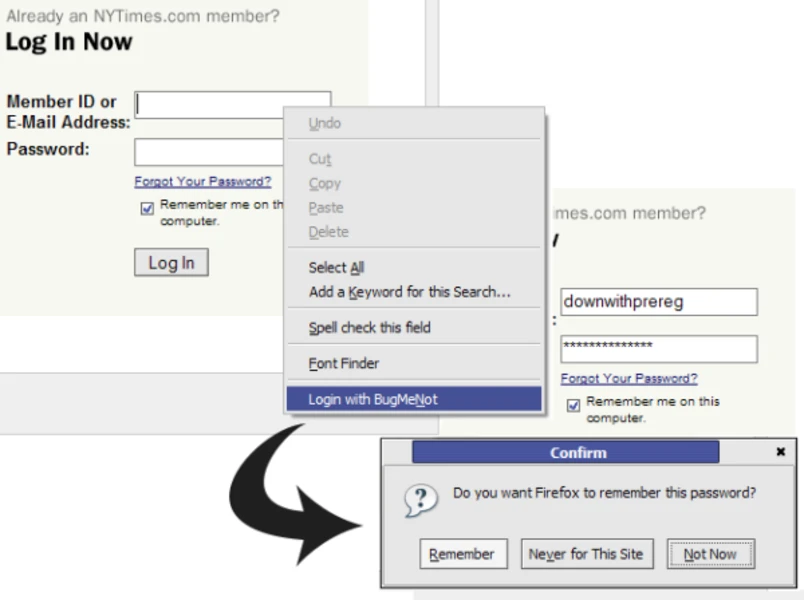
When you visit a site that requires registration, you can activate BugMeNot. The extension will query its online database for a set of username and password combinations that have been publicly shared. It then attempts to log you in automatically. If one set fails, it will try the next until it finds one that works.
This is an open, community-driven system. Users can also submit their own registration information to the BugMeNot database to help others. The extension is designed to be invisible, sitting discreetly in your Firefox context menu, ready to be used when needed.
Main Features with Detailed Descriptions
1. Automatic Login with Shared Credentials
The core feature of BugMeNot is its ability to automatically log you into websites using community-submitted accounts. Instead of going through the manual process of registering, you can bypass the form entirely.
When you activate the extension on a supported site, it will automatically retrieve the stored username and password from the BugMeNot database and attempt to log you in. This process is incredibly fast and efficient, requiring no manual input from you.
2. Right-Click Context Menu Integration
BugMeNot integrates seamlessly into Firefox. Its interface is a simple option in your right-click context menu. There is no complex toolbar or intrusive interface.
To use the extension, simply right-click on a page that requires registration and select the BugMeNot option. The extension then springs into action. This simplicity makes it feel like a native part of the browser.
3. Community-Driven Database
The strength of BugMeNot lies in its user community. The database is built and maintained by users who submit their own registration information to share with others.
If you visit a site that BugMeNot does not recognize, you can quickly submit faux registration information. This helps build the database and assists other users who might encounter the same site in the future.
4. Customizable Options for User Control
While BugMeNot is designed to work “out of the box” in full automatic mode, it does offer a few configurable options. These include the ability to:
- Disable the automatic submission of data.
- Disable the automatic entry of the next account if the first one fails.
These options give advanced users a degree of control over the extension’s behavior.
System Requirements
BugMeNot is a lightweight extension with very specific requirements.
| Requirement Category | Minimum Specification |
|---|---|
| Browser | Mozilla Firefox (specific versions: 2.0 – 3.6) |
| Operating System | Windows 2000, 98, ME, XP, NT, 10 |
| Additional Requirements | None |
How to Install BugMeNot
The installation process for BugMeNot is straightforward, though it is different from a standard Windows application.
Step 1: Download the Extension File
Go to the trusted download page (such as the CNET link provided). Click the “Download Now” button. The download will be a Firefox extension file (.xpi).
Step 2: Open the File in Firefox
Navigate to the folder where you downloaded the .xpi file. Double-click the file. This should prompt Firefox to open and ask you if you want to install the add-on.
Step 3: Allow the Installation
Click “Install” or “Add” when prompted by Firefox.
Step 4: Restart Firefox
You may be prompted to restart your browser to complete the installation.
Step 5: Verify the Installation
Once Firefox restarts, you will find BugMeNot in your right-click context menu. You can now begin using the extension.
Pros and Cons Table
To provide a balanced view, here are the strengths and weaknesses of BugMeNot.
| Pros (Advantages) | Cons (Disadvantages) |
|---|---|
| Protects your privacy: Avoids giving out your email and personal data. | Not always reliable: Usernames and passwords can be outdated or blocked. |
| Saves time: Eliminates the need to fill out registration forms. | Does not work on pay sites: Only works for sites with free registration. |
| Free and lightweight: Adds minimal overhead to your browser. | Limited scope: May not work on all sites. |
| Community-driven: Users can contribute, keeping the database active. | Older extension: Compatibility is limited to specific, older versions of Firefox. |
| Easy to use: Integrated into the right-click context menu. | Potential for incorrect form filling: May put credentials in the wrong fields on complex pages. |
Practical Use Cases and Benefits
Use Case 1: Reading a News Article
Scenario: You find a link to an interesting news article, but the site requires you to register an account to read it.
Benefit: You right-click, select BugMeNot, and you are instantly logged in with a shared account. You can read the article without spending a minute filling out a form or risking your email address being sold to advertisers.
Use Case 2: Accessing a Forum to Read a Discussion
Scenario: You find a forum thread in a Google search, but you need to be a member to view it.
Benefit: You use BugMeNot to log in, read the thread, and move on. You do not need to create a permanent account for a site you will likely never visit again.
Use Case 3: Bypassing a Registration for a Software Trial
Scenario: A site asks you to register before you can download a free software trial.
Benefit: You quickly bypass the registration wall, get the download link, and are on your way.
Frequently Asked Questions (FAQ)
1. Is BugMeNot legal to use?
Yes, BugMeNot is legal. It provides access to shared, publicly submitted information. However, it is important to respect a website’s terms of service. This tool is designed for sites that offer free content but require a login. It is not intended for bypassing paywalls for premium content.
2. What websites does BugMeNot work on?
It works best on websites that offer free content but require a user registration, such as many news and media sites. It does not work on sites that require payment or a paid subscription.
3. How does BugMeNot get its login information?
The information comes from the community. Users who are members of a site can choose to submit their own login credentials to the BugMeNot database to share with others.
4. What should I do if BugMeNot does not work on a site?
If the extension does not work, the shared credentials in the database may have been disabled or are outdated. You can try the manual process of selecting a different account, or you can choose to submit new credentials to help the community.
5. What are the “few options” in the settings?
The settings include options to disable the automatic submission of data and to disable the automatic entry of the next account if the first fails.
Conclusion
BugMeNot is a unique and useful extension that highlights a specific flaw in the modern web: the requirement to register for free content. By providing a simple, community-driven solution, it saves users time and helps protect their privacy. While the project is older and its database may not be as active as it once was, it remains a tool with a dedicated following.
Its legacy is the idea that access to free content should not require a permanent login. If you are concerned about your privacy and find yourself constantly registering for sites you will never use again, BugMeNot is a lightweight solution worth trying.
Download BugMeNot today and simplify your web browsing experience.