Introduction
Remember the last time you worked through a complex calculation on a standard calculator? You’d punch in numbers, hit equals, get a result, and then… what? If you made a mistake somewhere in the middle, you’d start all over again. And if you needed to document your work for someone else, you’d either scribble notes on paper or rebuild everything in a spreadsheet just to show your reasoning.
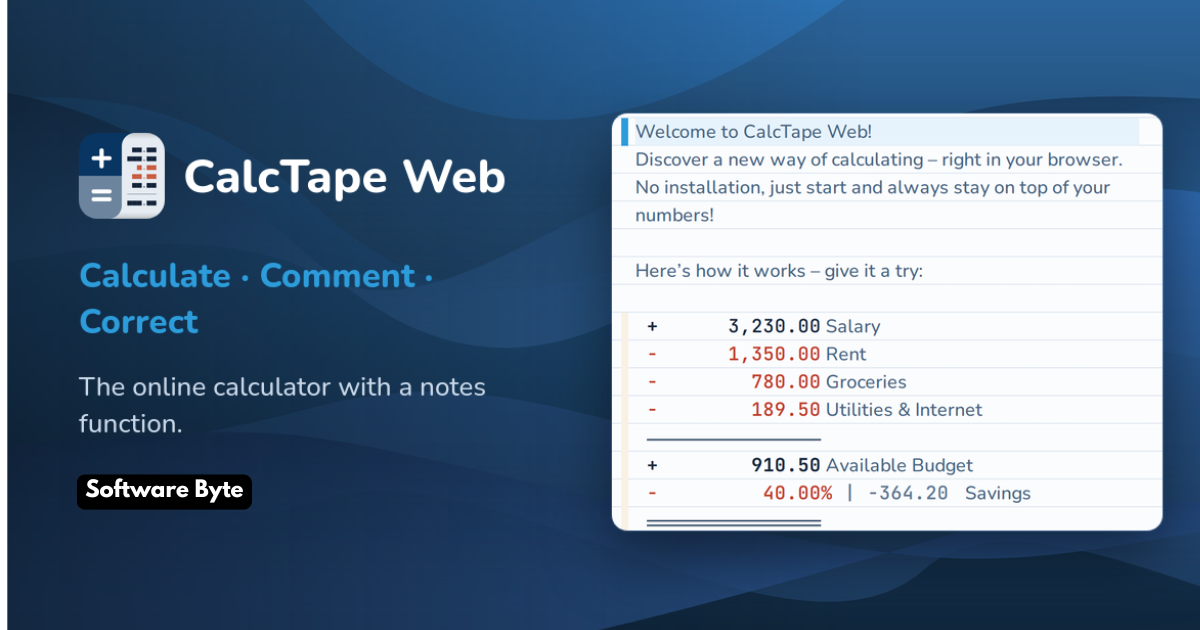
This is the problem CalcTape solves. Unlike traditional calculators that only show you the current input and final result, CalcTape creates a visible “paper tape” of your entire calculation process. Every number you enter, every operation you perform, and every result you generate stays visible on screen. You can review your work, spot errors instantly, and make corrections without starting from scratch.
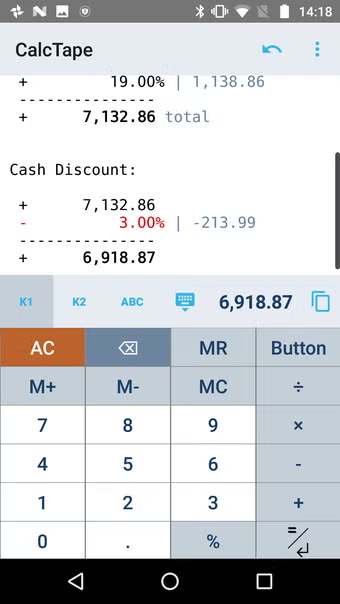
It’s a simple concept—make calculations transparent and editable—that transforms how people work with numbers. Whether you’re a student checking your math homework, an accountant preparing financial statements, or someone managing a household budget, CalcTape brings clarity to the often-opaque world of numerical calculations.
What Makes CalcTape Different From Standard Calculators?
The Visible Calculation Process
Think about how a conventional calculator works: you enter a number, press an operator, enter another number, and press equals. The screen shows you only the current value, and once you move to the next operation, the previous steps vanish into the device’s memory. If you want to verify what you entered, you’re out of luck.
CalcTape flips this model completely. Every line of your calculation appears on screen, just like a written ledger. You can see each entry, each operation, and each intermediate result. This transparency is particularly valuable when working with long, multi-step calculations where errors can easily creep in and go unnoticed until the final result seems wrong.
For example, if you’re calculating the total cost of a construction project with dozens of line items, you can see every figure on the tape. If the final total seems too high or too low, you can scan back through the entries to find where things might have gone wrong. This visibility is the core reason many users describe CalcTape as feeling like a “spreadsheet without the spreadsheet hassle”.
Dynamic Recalculation: Correct Mistakes Without Starting Over
Perhaps CalcTape’s most powerful feature is dynamic recalculation. When you change any number or operator anywhere in your calculation, the entire tape updates automatically. This is where the application truly transcends traditional calculator functionality.
Imagine you’ve entered a series of expenses for a month, and later you realize you accidentally typed $1,500 instead of $150 for one purchase. With a regular calculator, you’d have to re-enter the entire sequence from scratch. With CalcTape, you simply click on the error, correct it, and watch as the final total adjusts instantly.
This ability to edit any part of the calculation at any time makes CalcTape remarkably forgiving. It also encourages experimentation. You can change assumptions, test different scenarios, and see the impact on your final result without tedious re-entry. It’s like having a conversation with your numbers: you ask “what if,” and CalcTape shows you the answer immediately.
Core Features and Functionality
The Paper Tape Interface
The paper tape concept is the heart of CalcTape’s design. As you calculate, entries appear in a scrolling list format, much like an old-fashioned adding machine tape but on your screen. Each entry is clearly labeled, with numbers and operators displayed in a clean, easy-to-read layout.
Users consistently praise this interface for its clarity and intuitiveness. One reviewer noted that the ability to see and edit everything on the tape makes it the “best calculator app” they’ve ever used. The visual nature of the tape reduces errors because you’re not working blind; you can see each entry as it’s made and catch mistakes in real-time.
Adding Context with Comments and Notes
Numbers without context can be meaningless, especially when you return to a calculation days or weeks later. CalcTape addresses this with a commenting feature that allows you to add text notes alongside your numerical entries.
This feature transforms a simple calculation into a well-documented record. You can label entries like “Rent – June,” “Client invoice #1045,” or “Estimate for kitchen remodel.” When you save the calculation, these comments remain attached to their corresponding numbers, providing essential context for future reference.
For professionals who need to justify their work to auditors, colleagues, or clients, this documentation capability is invaluable. It also helps students demonstrate their problem-solving process to instructors, and individuals who want a clear record of their financial calculations.
Saving and Reusing Calculations as Templates
One of CalcTape’s most practical features is the ability to save calculations as templates. This means you can create a calculation structure once and reuse it repeatedly with different numbers.
Consider a scenario where you regularly perform the same type of calculation, such as generating a monthly expense report or calculating a recurring budget. Instead of re-entering the same structure each time, you save it as a template. When you need to run the calculation again, you open the template, replace the old numbers with new ones, and CalcTape delivers updated results.
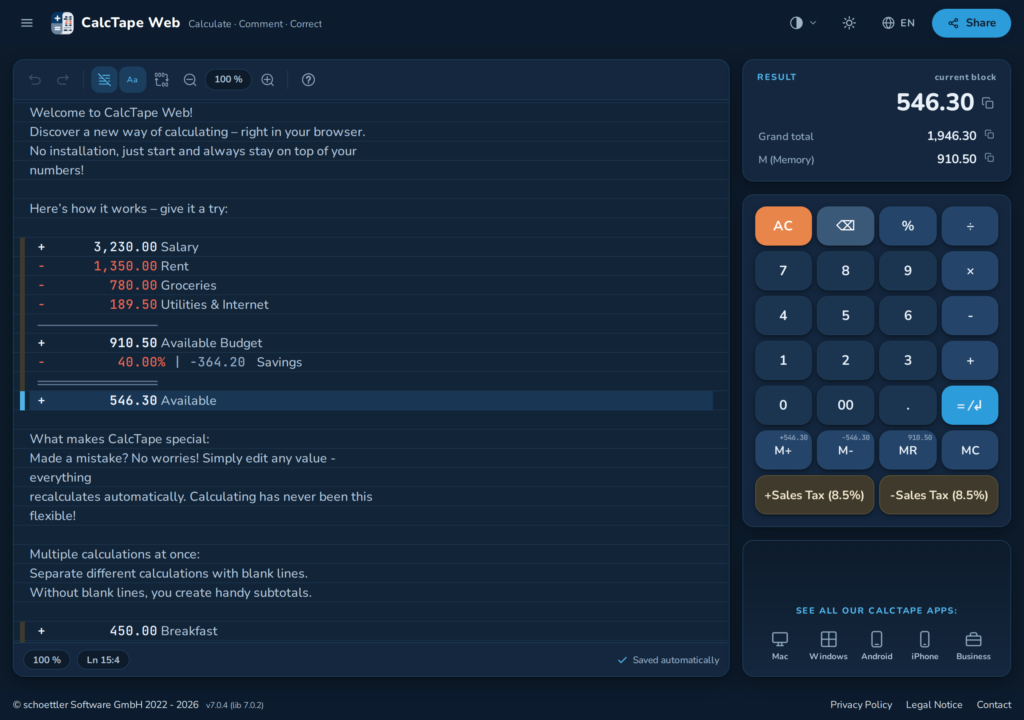
This saves time and ensures consistency across repeated calculations. Users have reported using this feature for everything from monthly expense reports to complex accounting tasks.
Programmable Buttons and Customization
CalcTape allows you to create custom buttons for functions you use frequently. For instance, if you routinely calculate sales tax at a specific rate, you can program a button that adds that tax automatically. If you frequently convert currencies, you can set up a button for that conversion.
The free version includes a limited number of these programmable buttons, while the Pro version offers unlimited customization. Users have reported using this feature for tax calculations, discount percentages, and other repeated operations.
The interface also supports theme customization, allowing you to adjust the visual appearance to suit your preferences. Recent updates have improved this functionality with interface revisions and bug fixes.
CalcTape Editions: Free vs. Pro
What You Get in the Free Version
The free version of CalcTape provides solid basic functionality for most users. You can:
- Create and view calculations on the paper tape
- Add comments to entries
- Perform basic arithmetic, exponentials, and percentages
- Use a limited number of customizable buttons
- Correct mistakes through dynamic recalculation
For many users, this free version is sufficient for everyday tasks. One reviewer described it as an “excellent, complete and useful GUI” that “handles all basic calculations well”. The free version is often described as a great way to get started with the application before deciding whether the Pro upgrade is necessary.
Pro Version Features
The Pro version unlocks CalcTape’s full potential with several important additions:
- File Saving: Save your calculations as files for later reference, and organize them for different projects or clients
- Unlimited Custom Buttons: Create as many programmable buttons as you need, rather than being limited to just a few
- Advanced Keypad Layouts: Customize and switch between different keypad designs, including a fully customizable function keypad without numbers
- Function Creation: Create your own functions or text snippets that can be entered with a single button press
- Calculation Sharing: Share your calculations via email or other standard sharing methods on your platform
- Printing and Export: Print calculations directly or export them in HTML format for easy sharing
The Pro version represents a one-time purchase rather than a subscription, making it accessible for users who need the advanced features without ongoing costs.
Who Benefits Most from CalcTape?
Students and Educators
Students performing multi-step calculations often struggle to maintain accuracy when working with traditional calculators. CalcTape provides a clear record of each step, allowing students to check their work and identify where they might have made an error. The commenting feature enables students to explain their reasoning, potentially helping with assignments that require showing work.
Business Professionals and Accountants
For business users, accuracy and documentation are paramount. CalcTape’s ability to create a permanent, annotated record of calculations makes it valuable for expense tracking, budget preparation, and financial analysis. The ability to save templates for recurring calculations such as monthly expense reports or quarterly projections also saves significant time.
Individuals Managing Finances
Personal finance often involves multiple calculations: tracking expenses, calculating monthly budgets, or comparing costs for major purchases. CalcTape provides a simple way to organize these calculations and revisit them later. Users have reported using the application to reconcile checkbooks, track monthly bills, and plan household budgets.
Anyone Who Uses a Calculator Regularly
Even for simpler daily tasks, CalcTape offers advantages. The ability to see all calculations at once and make corrections mid-process reduces frustration and improves accuracy. Once you’ve used a tape-style calculator, going back to a conventional display can feel limiting.
Platform Availability and Compatibility
Windows Version
CalcTape originally gained popularity as a Windows application. The desktop version integrates well with Windows workflows and offers the full range of features. It works on Windows Vista, Windows 7, Windows 8, Windows 10, and various Windows Server editions.
Mobile Apps
CalcTape is also available as an app for both Android and iOS devices. Reviews indicate that the mobile apps maintain the core functionality while being optimized for smaller screens. Users report that the mobile versions are particularly useful for on-the-go calculations.
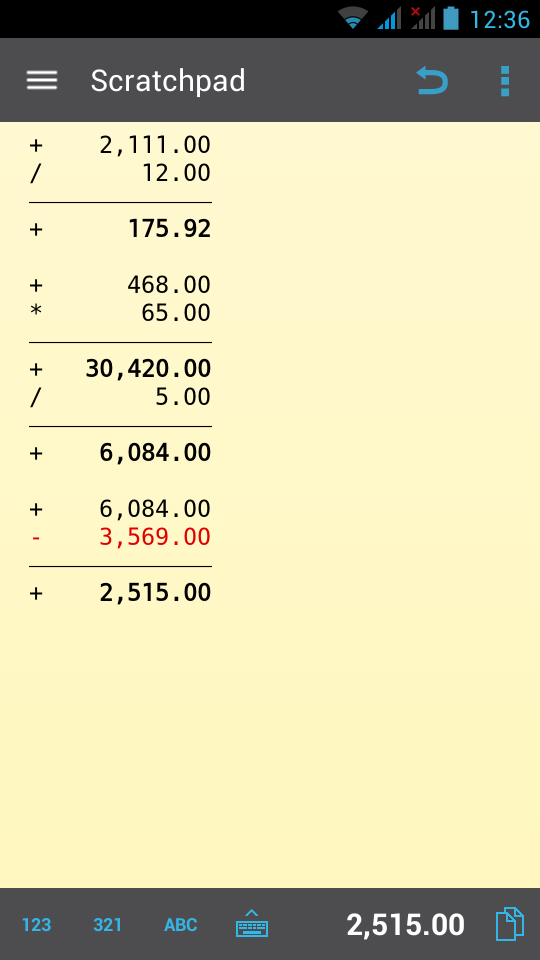
Users on mobile platforms have also noted that they can sync their calculations across devices, making it easy to start a calculation on one device and continue it on another.
Cross-Platform Experience
The availability of CalcTape on multiple platforms gives users flexibility. You can work on a calculation on your desktop PC, continue on your tablet, and review it on your phone. This cross-platform accessibility is useful for professionals who work in different environments throughout the day.
Real User Experiences and Reviews
Positive Feedback
User reviews for CalcTape are generally positive, with many praising the application’s clarity and usefulness. A common theme among reviewers is the appreciation for being able to see their calculations on the tape and make corrections easily.
One user described CalcTape as “nicest calculator app for windows I have ever used,” praising its “intuitive, clean and well-designed interface, easy to read”. Another noted that the tape feature eliminates the need for “paper and many sheets of paper” because you can undo errors and recalculate lines.
Students, in particular, have found the application useful. One MBA student noted that they could save calculations to a file in case they needed them later, calling it “a great help while taking my MBA classes”.
A long-term user summed up the experience: “I like the intuitive nature of calculating; the ability to go back and correct a figure and have the calculation update take place automatically; I like the ability to ‘Save’ the work and have it available hours, days, months, even years later”.
Common Criticisms
While overall reception is favorable, some users have noted limitations. The primary complaint is that the free version’s feature set is limited, with advanced functions reserved for the Pro version. Users needing sophisticated mathematical tools may find the basic version restrictive.
Some users have also mentioned that the calculator layout can be difficult to read on certain devices. One reviewer noted that “the numbers and symbols on the calculator are so small and not bold,” though this was later addressed with a keypad font size adjustment.
A few users have also expressed frustration about the time it can sometimes take to receive a response from the developer when they report an issue.
CalcTape Compared to Other Tools
Versus Standard Calculator Apps
The most common comparison is between CalcTape and traditional calculator applications. The key difference is the paper tape, which provides visibility, editability, and documentation capabilities that conventional calculators lack.
For simple one-step or two-step calculations, a standard calculator may be sufficient. However, when calculations become more complex—involving multiple entries, nested operations, or the need for documentation—CalcTape’s advantages become apparent.
Versus Spreadsheet Software
CalcTape has been described as an “Excel Lite” or a “spreadsheet with a calculator interface”. For simple calculations where a full spreadsheet application would be overkill, CalcTape offers a middle ground.
While spreadsheets provide greater flexibility and power, they also require more setup and configuration. CalcTape’s interface is simpler and more immediate—you start typing numbers and the tape builds automatically, without needing to define cell references or formulas.
Versus Paper Methods
Many users come to CalcTape after working with paper and pen for complex calculations. While this method provides similar visibility, it lacks the dynamic recalculation feature. If you make an error on paper, you either erase and rewrite or start from scratch. With CalcTape, you fix the error and watch everything update automatically.
Getting Started with CalcTape
Installation
Installing CalcTape is straightforward. The application is available from various software download sites, including CNET Download, as well as official app stores for mobile platforms. The installation process typically involves downloading the application and running the setup file.
Users have reported that the download process generally works smoothly, though some have noted that it may come bundled with other promotional software or toolbars. As one user warned, “when I downloaded it, it came with a bunch of unnecessary ads, tool bars I didn’t want, etc. Once you sort through and remove those, it’s a good program”. Users should pay attention during the installation process to ensure they only install the application they want.
Initial Setup
After installation, CalcTape starts with a blank tape ready for your first calculation. The interface is simple and uncluttered. You can begin entering numbers and operations immediately.
The application includes an “About” or “Help” section that provides basic guidance on using the features. For those who prefer video tutorials, the developer also provides support materials online.
First Calculation
Creating your first calculation is simple:
- Enter a number
- Select an operation (addition, subtraction, multiplication, division)
- Enter another number
- Continue entering numbers and operations
- Press the equals key to see the final result
As you enter each line, it appears on the tape, with the running total displayed at the bottom. You can add comments by clicking on a line and typing text. When you need to correct an entry, simply click on it and make your change.
Tips for Maximizing CalcTape’s Potential
Use Comments for Clarity
One of CalcTape’s most underused features is the commenting capability. Adding a few words to explain what a number represents can transform a confusing list of figures into a clear record. This is particularly valuable when you need to revisit a calculation days or weeks later.
Save Templates for Repetitive Tasks
If you find yourself performing the same type of calculation repeatedly, save it as a template. This simple habit can save significant time over the long run. Examples include monthly expense reports, quarterly tax calculations, or recurring project estimates.
Experiment with Custom Buttons
Even if you don’t upgrade to the Pro version, the free version offers some customizable buttons. Use these for functions you use frequently, such as adding a specific tax rate or converting measurements.
Explore Keyboard Shortcuts
For users who prefer keyboard over mouse, CalcTape offers keyboard shortcuts to speed up operations. On some platforms, the app also supports key commands for switching between tapes, clearing calculations, and memory functions.
FAQs About CalcTape
1. Is CalcTape free to use?
Answer: Yes, CalcTape offers a free version that includes core functionality such as the paper tape interface, basic calculations, comments, dynamic recalculation, and a limited number of customizable buttons. The free version is suitable for many everyday needs. For users who require more advanced features, there is a Pro version available as a one-time purchase (not a subscription). The Pro version includes file saving, unlimited custom buttons, advanced keypad layouts, function creation, sharing capabilities, and printing/export options.
2. Is CalcTape available for Mac?
Answer: Yes, CalcTape is available as a “CalcTape Paper Tape Calculator” app on the Mac App Store. The application is cross-platform, with versions available for Windows (the original platform), macOS, iOS (iPhone and iPad), and Android. This cross-platform availability allows users to work on calculations across different devices.
3. What makes CalcTape better than a standard calculator?
Answer: CalcTape offers several advantages over standard calculators: a visible paper tape that shows every entry and operation; dynamic recalculation that updates all results when you change any part of the calculation; the ability to add comments and context to entries; the option to save calculations as files and templates for reuse; and customizable buttons for frequently used operations. These features reduce errors, improve transparency, and make complex calculations easier to manage.
4. Can I edit numbers after I’ve entered them?
Answer: Yes, one of CalcTape’s primary features is the ability to edit any number or operator in the calculation at any time. When you make a change, the entire calculation updates automatically. This allows you to correct mistakes without re-entering everything and to experiment with different scenarios by changing assumptions and seeing how the final result changes.
5. What are the limitations of the free version?
Answer: The free version of CalcTape provides core functionality but has some limitations. It includes a limited number of customizable buttons, while the Pro version offers unlimited. The free version doesn’t allow you to save your calculations as files for later use, nor does it include advanced sharing options. The free version also has limited keypad layout customization. For most users, the free version is adequate for basic arithmetic and everyday calculations, but the Pro version unlocks the full potential for power users.
Conclusion
CalcTape represents a thoughtful reimagining of what a calculator can be. By making calculations visible and editable, it addresses fundamental frustrations that many users experience with traditional calculators: the inability to review work, the difficulty of correcting errors, and the lack of documentation.
The application’s core concept—the paper tape—is simple but powerful. It transforms the calculation process from a series of ephemeral operations into a transparent, audit-friendly record. The dynamic recalculation feature encourages experimentation, and the ability to add comments and save templates turns a calculator into a tool for organized, repeatable work.
While the free version has limitations, it provides solid functionality for most users. The Pro version offers valuable upgrades for those who need advanced features such as file saving, unlimited customization, and enhanced sharing capabilities.
Whether you’re a student checking your work, a business professional documenting financial calculations, or someone who wants greater clarity in everyday arithmetic, CalcTape offers a refreshing alternative to conventional calculators. It’s not just a tool for computing numbers—it’s a tool for thinking with numbers.
For anyone who has ever stared at a blank calculator screen wondering if they missed a key or made a mistake two steps back, CalcTape provides welcome clarity. It turns a potentially frustrating experience into a transparent, manageable, and even enjoyable process of working through numbers to get the right answer.