For .NET developers, the Windows Forms DataGrid control is a powerful tool for displaying and managing data. However, its default column styles can be somewhat limited. The DataGridColumns .NET Assembly from RustemSoft addresses this by adding a suite of new, highly functional column types that significantly extend the control’s capabilities. This guide provides a comprehensive look at this developer tool and its features.
What is DataGridColumns .NET Assembly?
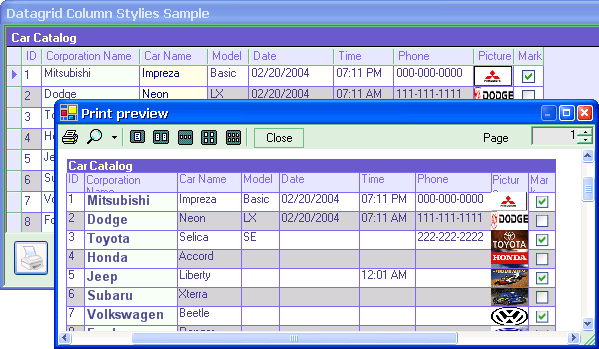
DataGridColumns .NET Assembly is a software package specifically designed for .NET developers. It’s a dynamic link library (DLL) that integrates directly with the Microsoft Windows .NET Forms DataGrid control. The assembly’s primary purpose is to enhance the DataGrid by providing a richer set of column styles, allowing developers to create more intuitive and user-friendly data interfaces.
Key Features and Column Styles
The assembly includes a collection of eight distinct DataGrid Column Styles, each designed for a specific type of data or user interaction:
1. ComboBox Column Style
This allows a column to act as a dropdown list. It is perfect for fields where users should select from a predefined set of options, improving data consistency and user experience.
2. XPButton Column Style
Inspired by the look and feel of classic Windows XP buttons, this column style adds a clickable button to a DataGrid. This is useful for creating action columns within a grid, such as an “Edit,” “Delete,” or “Details” button.
3. Memo Column Style
This style is designed for handling large blocks of text. It is ideal for columns that contain lengthy notes, descriptions, or comments that would be cumbersome to view in a standard text box.
4. Button Column Style
This provides a simpler button implementation within the grid, allowing you to handle click events for specific cells.
5. DateTimePicker Column Style
This style integrates a calendar and time selection interface directly into the DataGrid. This ensures that users can only enter valid dates and times, reducing data entry errors.
6. DateTime Column Style
This is a more basic column for displaying and editing standard date and time values with appropriate formatting.
7. Numeric Column Style
This column is designed specifically for numeric data. It often includes features like number formatting and validation to prevent non-numeric entries.
8. TextFractions Column Style
While less common, this style suggests it is designed for handling fractional or scientific numbers, providing specific formatting and editing capabilities.
Who is This Tool For?
DataGridColumns .NET Assembly is a developer tool. Its target audience is professional software developers and programmers working within the Microsoft .NET environment, specifically those using Visual Studio .NET. It is designed to streamline the creation of professional, data-rich Windows Forms applications, allowing developers to add advanced user interface elements without extensive custom coding. It has been well-received by users in the business world, who found it to be a “welcome addition” to the standard Microsoft offering.
Important Considerations
Legacy Software
The software’s compatibility with older operating systems, including Windows 95, 98, and ME, indicates that it is a legacy tool. While it is listed as compatible with Windows 10, its core technology may not be optimized for the latest .NET frameworks or modern development practices.
Niche Focus
The tool is focused exclusively on enhancing DataGrid columns. It does not provide other UI controls and serves a single, specialized purpose.
Limited Updates
Version 2.6.2, the latest version, has been available for some time and may not include the newest features or bug fixes.
Frequently Asked Questions (FAQs)
1. What is DataGridColumns .NET Assembly?
It is a software DLL for .NET developers that adds new column styles, like comboboxes and buttons, to the standard Windows Forms DataGrid control.
2. What column styles are included in the assembly?
The assembly includes styles for combobox, XPButton, Memo, Button, DateTimePicker, DateTime, Numeric, and TextFractions.
3. Who should use this assembly?
This tool is intended for .NET developers using Visual Studio who want to enhance the functionality and appearance of their DataGrid controls.
4. Is DataGridColumns .NET Assembly free?
Yes, the software is free to download and use according to the developer’s description on the download page.
5. Is this tool compatible with modern .NET development?
While it may still function, the assembly is a legacy tool and its compatibility with the latest .NET Core or .NET 5/6+ frameworks is not specified. It is best suited for older Windows Forms projects.
Conclusion
The DataGridColumns .NET Assembly is a valuable developer tool that effectively addresses a specific need: enhancing the .NET DataGrid. By offering a wide array of specialized column styles, it provides developers with the building blocks needed to create more polished, user-friendly data management interfaces. While it is a legacy tool, it remains a useful resource for developers working on older Windows Forms applications who need to extend the capabilities of the native DataGrid control.