Read our review of Remind It, a simple and effective reminder software for Windows. Discover its features, alarm types, and how it helps you stay on top of your tasks.
Introduction: Never Forget an Important Task
In our busy lives, it’s easy to forget important tasks, appointments, and deadlines. Whether it’s a meeting, a bill to pay, or a simple errand, having a reliable reminder system is essential. Remind It is a free Windows software application designed to help you stay on top of your schedule. This review explores its features, its ease of use, and who it’s best suited for.
What is Remind It?
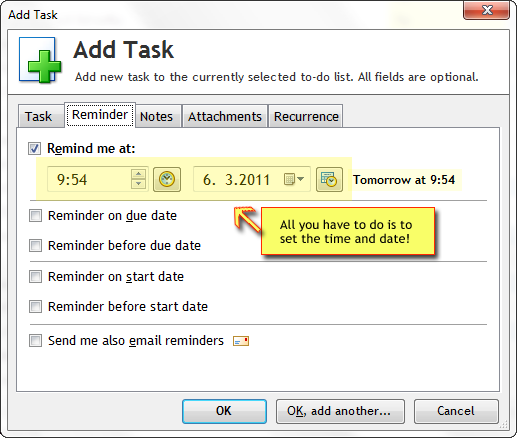
Remind It is a free, lightweight reminder application for Windows. Its primary function is simple: to help you create and manage reminders for tasks and events. The software is designed to be a straightforward and effective tool for personal time management.
It is ideal for users who want a simple, no-fuss reminder system without the complexity of a full-fledged calendar application. With Remind It, you can set multiple reminders per day with customizable settings.
Key Features of Remind It
Three Distinct Alarm Types
Remind It features three distinct alarm types to suit different needs:
- Pop-Up Alarms: A classic reminder that displays a message on your screen.
- Sound Alarms: Plays a sound to get your attention.
- Email Alarms: Sends a reminder to your email address, ensuring you see it even if you are away from your computer.
Customizable Settings
You can customize various settings for each event.
- Personalized Messages: You can create custom messages for each reminder.
- Flexible Scheduling: The software supports setting multiple reminders per day.
Simple Interface
The software is designed with a simple, user-friendly interface that makes creating and managing reminders quick and easy.
Pros and Cons
Strengths
- Free: It is completely free to use.
- Simple: The interface is straightforward and easy to navigate.
- Multiple Alarm Types: Offers three different ways to be reminded.
- Multiple Reminders: You can set multiple reminders per day.
Limitations
- No Recurring Events: The software does not mention support for recurring event options.
- Basic Functionality: It is a simple tool and lacks the advanced features of full calendar applications.
- Email Client Launch: The email alarm’s function is basic.
Who Is Remind It For?
- Students: For remembering assignment deadlines and class times.
- Busy Professionals: For meeting reminders and task management.
- Casual Users: For everyday tasks like taking medication, making calls, or running errands.
Frequently Asked Questions (FAQs)
1. Is Remind It free to use?
Yes, Remind It is a completely free application for Windows.
2. What types of alarms does Remind It have?
It features pop-up alarms, sound alarms, and email alarms.
3. Can I set multiple reminders for the same day?
Yes, the software supports multiple reminders per day.
4. Does Remind It support recurring reminders?
The software does not explicitly mention support for recurring events, focusing instead on single reminders.
5. Is Remind It suitable for business use?
It is a simple tool that can help with personal time management. For complex business scheduling, a full calendar application would be more appropriate.
Conclusion: A Simple Solution for Everyday Reminders
Remind It is a straightforward and effective tool for setting quick reminders on your Windows PC. Its simple interface and multiple alarm types make it a useful application for anyone who needs a little help remembering their daily tasks. While it may lack the advanced features of comprehensive calendar applications, its simplicity is its strength. For users who need a no-fuss reminder system, Remind It is a practical and reliable solution.