Introduction
Imagine having a complete software toolkit that fits in your pocket. No installations, no registry clutter, and no leaving your personal settings behind on someone else’s computer. This is the promise of portable software, and winPenPack Flash 2GB delivers this vision in a comprehensive package.
winPenPack Flash 2GB is a curated collection of over 100 portable applications, all designed to run directly from a USB flash drive without requiring installation on the host computer. While the name suggests a 2GB drive requirement, the suite has evolved to serve users who want a ready-to-use portable workspace. This article explores what winPenPack offers, its strengths and weaknesses, and whether it remains relevant in today’s cloud-centric world.
Understanding Portable Software
What Makes Software “Portable”?
Traditional software leaves traces everywhere: registry entries, configuration files in system folders, and application data scattered across your hard drive. Portable software operates differently. All settings, preferences, and user data are stored within the application’s own folder. This means you can run it from a USB drive, external hard disk, or even a cloud-synced folder without affecting the host system.
The Advantages of Going Portable
The benefits of portable applications are significant. You can carry your entire software environment between work, home, and public computers. There’s no need to worry about administrative privileges or installation permissions. When you’re done, simply unplug the drive—no uninstallation required, and no leftover files polluting the system.
Portable software also protects your privacy. Since no trace is left on the host computer, your browsing history, documents, and personal settings remain with you. This makes portable suites like winPenPack particularly valuable for professionals working on shared or public computers.
What Is winPenPack Flash 2GB?
winPenPack is an Italian-developed project that gathers numerous portable applications into a single, self-contained package. Version 4.1, the most recent release, represents years of curation and refinement. The suite is designed for Windows operating systems, with compatibility stretching from Windows 95 through Windows 10.
Core Components and Organization
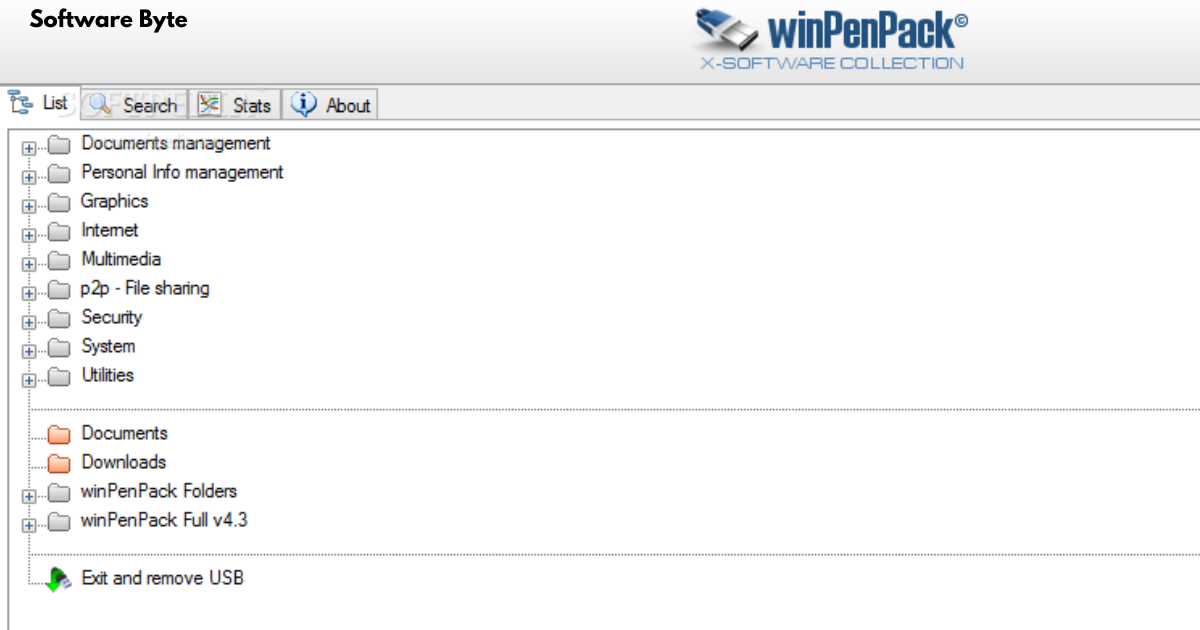
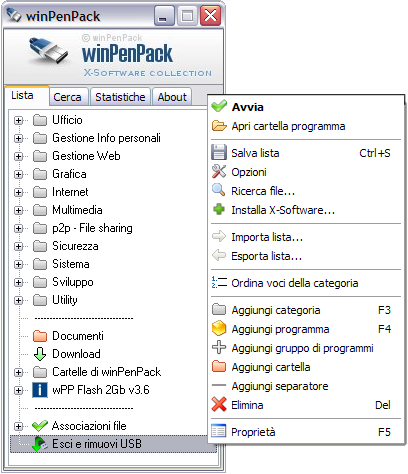
The suite organizes its applications into logical categories, making navigation intuitive. The main categories include:
- Graphics: Image editors, viewers, and manipulation tools
- Internet: Browsers, email clients, and communication tools
- Multimedia: Audio and video players, recorders, and converters
- Security: Antivirus tools, password managers, and encryption utilities
- System Utilities: System cleanup, file management, and diagnostic tools
- Office: Word processors, spreadsheets, and presentation software
- Utilities: Miscellaneous tools for various everyday tasks
Two Ways to Launch Your Apps
winPenPack provides dual launch methods for user convenience. A system tray menu offers quick access to your most-used applications, while a more comprehensive dialog window presents the full suite in an organized list. Both interfaces maintain the same logical category structure, allowing you to find what you need quickly.
The Good: What Makes winPenPack Valuable
Comprehensive Software Library
The suite’s greatest strength lies in its breadth. With over 100 applications, it covers virtually every common computing need. Whether you need to edit a photo, compose a document, browse the web securely, or clean up system files, winPenPack has something for you. This comprehensive approach means you can carry a complete computing environment in your pocket.
Portability and System Integrity
Running applications from a portable drive keeps your host system clean. Unlike installed software, portable apps don’t modify the Windows registry or scatter files throughout the system. This is particularly beneficial for shared computers, where maintaining system integrity is important, or for users who prefer to keep their systems lean.
Ready-to-Use Configuration
winPenPack comes pre-configured with sensible defaults. Most applications are ready to use immediately after extraction, saving you the time of setting up each tool individually. This plug-and-play approach makes the suite accessible even for users who aren’t technically inclined.
Developer’s Initiative
As one user reviewer noted, the winPenPack project represents a significant effort. Creating and maintaining a collection of over 100 portable applications requires substantial work: verifying compatibility, ensuring proper portability, updating versions, and testing configurations. The developer deserves credit for undertaking this ambitious project.
The Challenges: What to Consider Before Downloading
Mixed Software Quality
Not every application in the suite is equal. Some are full-featured, polished tools, while others are more niche utilities or less-refined offerings. The suite includes heavyweights like OpenOffice alongside lighter alternatives like AbiWord, raising questions about duplication. Similarly, the presence of three calendar programs suggests some redundancy that could be streamlined.
Licensing Confusion
One significant concern is the licensing situation. The developer notes that 12 applications in the suite are free for personal use only. If you’re planning to use winPenPack in a business environment or distribute it to employees, you’ll need to identify and potentially remove these restricted applications. This licensing complexity creates potential legal exposure for unwary users.
Language Barrier
The suite defaults to Italian upon first use, which can be confusing for non-Italian speakers. While you can change the language settings, the initial experience might be disorienting. This oversight suggests the developer primarily focused on the Italian market, despite the international nature of the software audience.
Security Concerns
A user review from the download page raised a concerning issue: an antivirus program detected a potential trojan within the package. While this could be a false positive—which occasionally occurs with portable software due to how it interacts with system processes—it highlights the importance of caution. Always scan downloaded files with reliable security software before use.
Download and Installation Experience
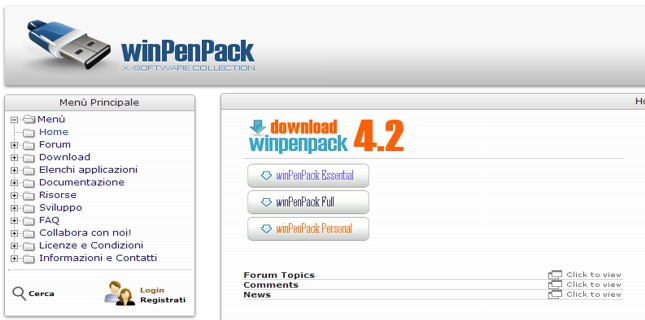
The download is substantial at approximately 740MB compressed, expanding to a larger installed footprint. While the installation process itself is quick, downloading such a large file requires patience and a stable internet connection. The size reflects the comprehensive nature of the suite but may be impractical for users with limited bandwidth or older systems.
Lack of Selective Installation
Once you extract winPenPack, you get everything. There’s no option to install only the applications you want. If you only need a handful of tools, you’re still carrying the entire suite. While you can manually delete unwanted applications, this requires time and understanding of which files are safe to remove.
Who Is winPenPack Flash 2GB For?
Ideal Users
winPenPack is best suited for users who frequently work on multiple computers: consultants, IT professionals, students, and remote workers. The ability to carry a consistent software environment between machines is invaluable for these users. Similarly, anyone who uses public or shared computers will appreciate the privacy and cleanliness benefits.
Less Suitable Cases
If you only use one computer and prefer installed applications, the portable approach may not offer significant advantages. Similarly, users with specific, specialized software needs might find the comprehensive suite includes unnecessary bloat. Those concerned about the licensing complications or potential security issues should also exercise caution.
Alternatives to winPenPack
PortableApps.com Platform
The most prominent alternative is PortableApps.com, which offers a similar concept with a more refined platform. It includes an application manager that simplifies updates and additions, a consistent menu system, and clear licensing information. The platform is actively maintained with regular updates.
Individual Portable Applications
Rather than a full suite, you can create your own portable toolkit by downloading individual portable applications. This approach gives you full control over what you carry, eliminates unused software, and simplifies licensing compliance. Websites like PortableApps.com and individual developer sites offer hundreds of portable tools.
Cloud-Based Alternatives
In an increasingly connected world, cloud-based solutions like Google Workspace and Microsoft 365 provide portable access without carrying physical media. However, these require internet access and may not include the same breadth of tools available in a local portable suite.
Making winPenPack Work for You
Before You Download
Check the system requirements: winPenPack supports Windows 95 through Windows 10, but newer Windows versions may have compatibility issues. Ensure you have sufficient free space and a reliable internet connection for the large download.
Security Precautions
Always verify downloaded files with antivirus software. Consider scanning the extracted files before use. If security is a primary concern, you might prefer to build your own portable toolkit using applications from trusted sources.
Customization
If you decide to use winPenPack, consider customizing it to meet your needs. Delete applications you don’t use. Review the licensing of each included tool. Change the language settings to your preference. This customization transforms the generic suite into your personal toolkit.
Consider the Alternatives
Before committing to winPenPack, evaluate whether an alternative better suits your needs. PortableApps.com offers a more polished experience with clearer licensing. A custom-built toolkit eliminates unused applications. Cloud-based solutions may be more practical in some environments.
Conclusion
winPenPack Flash 2GB represents an ambitious effort to create a comprehensive portable software environment. It offers an impressive collection of applications, clean system operation, and the freedom to carry your software toolkit anywhere. The developer has created something genuinely useful for a specific audience.
However, the suite has limitations that potential users should consider. Mixed software quality, licensing complexity, language barriers, and security concerns warrant caution. The lack of selective installation and large download size may be impractical for some users.
Ultimately, winPenPack is a viable option for users who need a wide range of portable applications and are willing to manage its quirks. For others, alternatives like PortableApps.com or custom-built portable toolkits may provide a better experience. Whichever path you choose, the ability to carry your software environment in your pocket represents a significant advantage in our increasingly mobile computing world.
Frequently Asked Questions
What exactly is winPenPack Flash 2GB?
winPenPack Flash 2GB is a collection of over 100 portable applications packaged together for use on USB drives or other portable storage. It includes tools for graphics, internet, multimedia, security, system utilities, and office work, all configured to run without installation on a Windows computer. Version 4.1 is the latest release, compatible with Windows 95 through Windows 10.
Is winPenPack Flash 2GB completely free?
The suite itself is free to download and use, but not all applications within it are freeware. According to the developer, 12 applications in the package are free only for personal use. If you plan to use winPenPack in a business environment or share it with employees, you need to identify and potentially remove these restricted applications to avoid licensing violations.
Does winPenPack work on modern Windows versions?
The suite officially supports Windows 95 through Windows 10. While many applications may work on Windows 11, compatibility is not guaranteed. Users have reported varying experiences, and some applications may require additional configuration or may not function correctly on newer operating systems.
How can I remove applications I don’t want from winPenPack?
There’s no automated selective installation feature. You need to manually delete unwanted applications from the winPenPack folder on your drive. However, exercise caution: some applications may share components, and removing them incorrectly could affect other tools. The safer approach is to delete entire application folders for tools you don’t need.
Is winPenPack safe to use?
While the suite has been widely downloaded (nearly 25,000 total downloads), user reports are mixed. One reviewer reported antivirus detection of a potential trojan, which could be a false positive. Always scan the package with updated security software before use. As with any software, especially portable applications, exercise caution and download only from reputable sources.