Introduction
In today’s digital workplace, PDF documents have become the universal standard for sharing and storing information. Whether you’re a business professional, researcher, student, or content creator, you’ve likely encountered the frustration of needing to extract images from a PDF file. Perhaps you’ve received a report with valuable charts and diagrams trapped within its pages, or you need to repurpose product photos from a supplier’s catalog. Manually taking screenshots often results in quality loss and is incredibly time-consuming.
This is where dedicated PDF image extraction tools come into play. Among the many options available, Coolmuster PDF Image Extractor has established itself as a specialized solution designed specifically for this task. This comprehensive review examines the software’s features, user experiences, technical requirements, and overall value proposition to help you determine if it’s the right tool for your needs.
Coolmuster PDF Image Extractor is a straightforward utility that enables users to extract images from PDF files and save them as JPEG or JPG format . The software distinguishes itself through its focus on a single primary function—image extraction—without the complexity and feature bloat of full-fledged PDF editors. This dedication to a specific task makes it particularly appealing to users who don’t need extensive PDF editing capabilities but require a reliable method to retrieve images from PDF documents.
What is Coolmuster PDF Image Extractor?
Coolmuster PDF Image Extractor is a dedicated software application designed to extract images from PDF files quickly and efficiently . Unlike full-featured PDF editors that offer image extraction as one of many functions, this tool specializes exclusively in this task, allowing for a streamlined and user-friendly experience.
The software is developed by Coolmuster, a company that creates a range of utility software for document management and data recovery. The PDF Image Extractor is part of their suite of document-focused tools and is available for both Windows and Mac operating systems.
At its core, the software performs one essential function: taking images embedded within PDF documents and saving them as separate JPEG files that can be used in other applications, presentations, or projects . This simplicity is both its primary advantage and its limitation, depending on the user’s needs.
Key Features
- One-Click Extraction: The software allows users to extract all images from a PDF file with a single click, eliminating the need for manual selection or complicated processes .
- Batch Processing: Users can process multiple PDF files simultaneously, saving significant time when working with numerous documents .
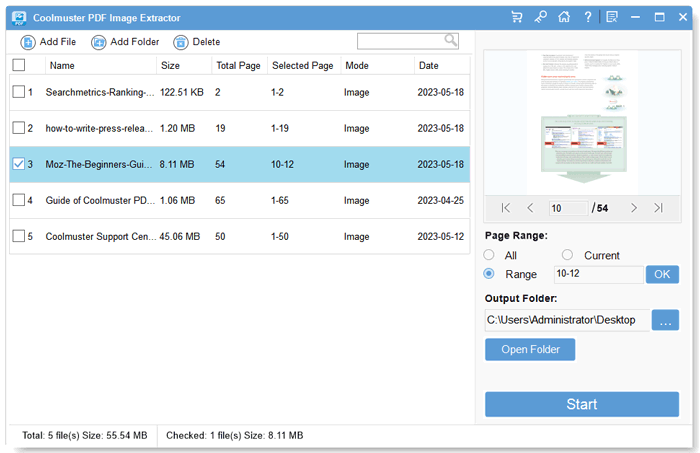
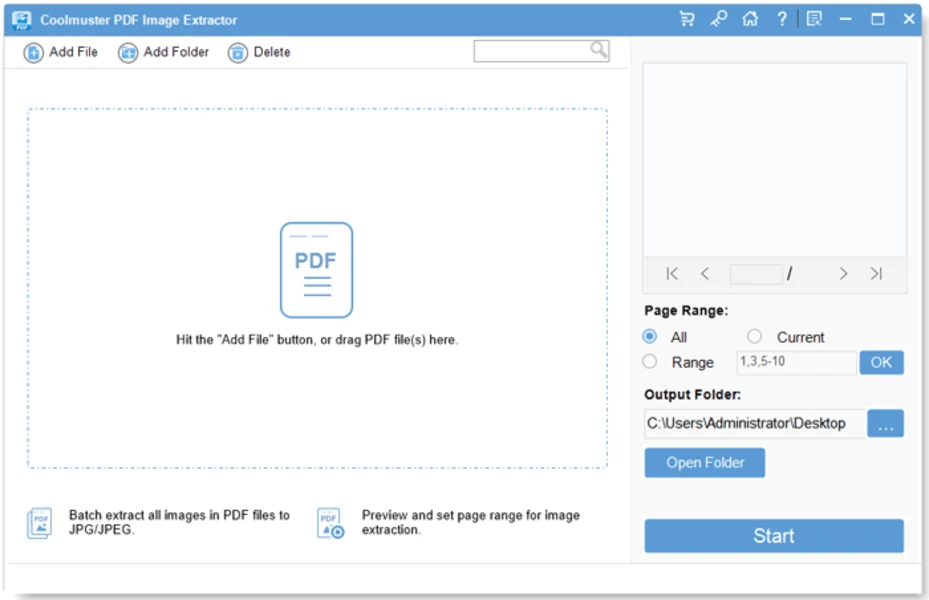
- Preview Functionality: Before extraction, users can preview the content of PDF files and set specific page ranges for extraction .
- Selective Extraction: Unlike some tools that extract all images without user input, this software allows users to choose specific images to extract .
- Standalone Operation: The program operates independently without requiring Adobe Acrobat Reader or any other third-party tools .
- Quality Retention: Extracted images maintain their original resolution and quality .
- Format Support: Currently supports output in JPEG/JPG format .
- Multi-Language Support: Recent versions have added support for multiple languages including Korean, Russian, Indonesian, Hindi, Turkish, and Dutch .
Technical Specifications and Requirements
Understanding the technical requirements is essential for ensuring compatibility with your system. Based on the official specifications, here are the key technical details :
| Specification | Windows Version | Mac Version |
|---|---|---|
| Operating System | Windows 11/10/8/7 | Mac OS X 10.7 or later |
| Processor | 1GHz (32-bit or 64-bit) or above | 1GHz Intel or above, M1 compatible |
| RAM | 256 MB minimum (1024 MB recommended) | 512 MB or more |
| Hard Disk Space | 200 MB or more free space | 200 MB or more free space |
| Input Format | ||
| Output Format | JPG, JPEG | JPG, JPEG |
| Latest Version | 2.3.3 (February 2, 2026) | 2.1.5 (January 26, 2019) |
The Windows version has seen more recent updates , with the latest version released in February 2026 adding support for multiple new languages. The Mac version appears to have a more stable update cycle, with the last major release in 2019 focused primarily on bug fixes.
The software size is approximately 17.4 MB, making it a relatively lightweight application that doesn’t consume excessive storage space .
How Coolmuster PDF Image Extractor Works
The software follows a straightforward three-step process that makes image extraction accessible to users of all technical skill levels .
Step 1: Import PDF Files
Users can load PDF files into the software through one of three methods:
- Click “Add File”: Browse your system to select individual PDF files or entire folders containing PDFs .
- Drag and Drop: Simply drag target PDF files directly onto the software interface .
- Batch Import: Select multiple files simultaneously for processing .
Step 2: Customize Output Settings
The software automatically sets JPEG/JPG as the default output format, so users who are satisfied with this format don’t need to make any changes . For those who want to specify a different location, the output folder can be customized using the “Browse” button.
Advanced options include:
- Page Range Selection: Users can extract images from specific pages rather than the entire document .
- Image Selection: Before extraction, users can preview images and select specific ones to extract .
Step 3: Start Extraction
Once files are loaded and settings are configured, users simply click the “Start” button to begin the extraction process . The software will extract all images from the specified PDF files, saving them to the designated output folder. The process can be stopped and restarted as needed.
This simple workflow is one of the software’s greatest strengths, making it accessible even to users who aren’t particularly tech-savvy. As one user noted, “The new released PDF Image Extractor is way better than before, and it is much easier to understand how to extract all my images from my PDF files” .
User Reviews and Feedback Analysis
User reviews provide valuable insights into the real-world performance of Coolmuster PDF Image Extractor. The feedback is largely positive, with users highlighting several key strengths:
Positive Feedback
Ease of Use: Multiple users praised the software’s user-friendly interface and straightforward operation. One reviewer noted that the “interface is convivial, and I could extract all the images in just a few clicks” . The intuitive design makes it accessible even for users with limited technical experience.
Extraction Quality: Users consistently reported that the software maintains original image quality and resolution during extraction . This is particularly important for professionals who need high-quality images for presentations, publications, or further editing.
Batch Processing Efficiency: The batch extraction feature has been highlighted as particularly valuable for users dealing with multiple PDF files. One user noted, “The batch processing feature is worth mentioning, as it allows me to extract images from several PDFs at once. The software retains the original image quality” . Another reviewer was impressed that “I loaded 12 different PDFs and all of the contained pictures could be processed in seconds” .
Selective Extraction: The ability to preview and select specific images for extraction was well-received. Users appreciated the control this provides, particularly when working with PDFs containing many images .
Standalone Operation: Users valued that the software operates independently without requiring Adobe Acrobat or other third-party tools .
Constructive Criticism
Limited to JPEG Output: While the software reliably extracts images, it only supports JPEG/JPG output format . Users who need other formats like PNG or TIFF may find this limiting.
PDF Editing Limitations: Some users noted that the software is focused solely on image extraction and doesn’t offer broader PDF editing capabilities. One reviewer mentioned that “if you require more extensive PDF editing features, you may need to explore other software options” .
Large File Performance: One user noted that they wished “it could handle larger files more efficiently,” suggesting that performance with very large PDFs might be an area for improvement .
Mixed Experiences
Most users reported positive experiences, though one reviewer on Mac OS X 10.11.4 noted that the application crashed immediately upon launch . This appears to be an isolated issue with a specific older OS version, as more recent reviews have been overwhelmingly positive.
Comparison with Other PDF Image Extraction Solutions
To provide context, it’s helpful to compare Coolmuster PDF Image Extractor with other methods and tools for extracting images from PDFs.
Coolmuster vs. Free Command-Line Tools
For technical users, command-line tools like pdfimages (part of poppler-utils) offer free image extraction capabilities . These tools are powerful and flexible, allowing extraction of images in their original formats using the -all or -j options.
Advantages of Command-Line Tools: Free, extremely flexible, lightweight, and capable of preserving original image formats beyond just JPEG.
Advantages of Coolmuster: User-friendly graphical interface, no need for command-line knowledge, preview functionality, and selective extraction capabilities.
Coolmuster vs. PDF Editors
Full-featured PDF editors like Nitro PDF or Adobe Acrobat include image extraction as one of many functions .
Advantages of PDF Editors: Comprehensive functionality beyond image extraction, including editing, annotation, and conversion.
Advantages of Coolmuster: Lower cost, simpler interface focused on the specific task, faster for users who only need image extraction.
Coolmuster vs. Online Extractors
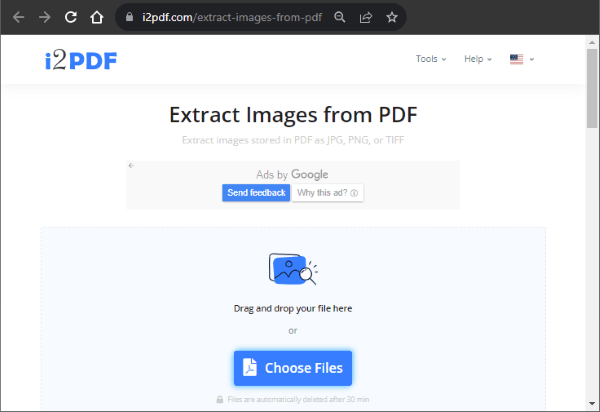
Numerous online services offer free PDF image extraction, such as PDF Candy .
Advantages of Online Extractors: No software installation required, often free for basic usage.
Advantages of Coolmuster: No file size limitations, works offline for privacy and security, batch processing capability, and no need to upload sensitive documents to third-party servers.
Coolmuster vs. Other Specialized Tools
Professional tools like Aspose.PDF Image Extractor for .NET offer developer-focused image extraction capabilities with support for multiple output formats including PNG, TIFF, BMP, and GIF .
Advantages of Developer Tools: Extensive output format support, programmatic integration, fine-grained control over extraction parameters, and support for vector image rendering.
Advantages of Coolmuster: Graphical user interface designed for end-users, simpler operation, lower cost, and no programming knowledge required.
For most users who need a straightforward way to extract images from PDFs without technical complexity, Coolmuster PDF Image Extractor strikes a good balance between functionality and ease of use.
Best Use Cases for Coolmuster PDF Image Extractor
Business Professionals
Business users frequently need to extract images from reports, presentations, and marketing materials. Coolmuster PDF Image Extractor makes it easy to repurpose charts, graphs, and product images for use in other documents and presentations. One user, a director, noted that “obtaining a large number of original quality images is crucial for me to perform post-processing on images as quickly as possible” .
Researchers and Academics
Academic researchers often work with scientific papers containing figures, diagrams, and data visualizations. The software’s ability to extract high-quality images from research papers facilitates inclusion in papers, presentations, and educational materials.
Students
Students frequently need to extract images from textbooks and lecture notes. The intuitive interface makes it accessible even for users with limited technical experience.
Content Creators
Bloggers, social media managers, and content creators often need to repurpose images from various source documents. The software provides a reliable way to extract and reuse images legally and efficiently.
Graphic Designers
Designers working with source material in PDF format can extract images for use in their projects. The quality retention feature ensures that images maintain their original resolution for professional results .
Pricing and Value Proposition
Coolmuster PDF Image Extractor is offered as a paid software solution with different licensing options. Based on the official website, the software provides good value for users who regularly need to extract images from PDFs.
Cost Considerations
- One-Time Purchase: Unlike subscription-based software, Coolmuster offers a one-time purchase model, which can be more economical in the long run.
- Free Updates: Purchased licenses remain valid for future updates . Users can upgrade to new versions for free, and registration information from the old version works for the upgrade version.
Value Proposition
The software offers significant value for:
- Frequent Users: Those who regularly extract images from PDFs will save considerable time compared to manual methods.
- Professionals: The quality retention and batch processing features justify the cost for professional use.
- Businesses: The license’s availability for Windows makes it suitable for deployment across organizational environments.
While the software may not be the cheapest option available, the combination of ease of use, reliability, and quality output makes it a worthwhile investment for users with regular image extraction needs.
Frequently Asked Questions
1. What are the system requirements for Coolmuster PDF Image Extractor?
For Windows, the software requires Windows 11/10/8/7, a 1GHz processor or above, at least 256 MB of RAM (1024 MB recommended), and 200 MB of free hard disk space. For Mac, it requires Mac OS X 10.7 or later, a 1GHz Intel processor or M1, 512 MB or more of RAM, and 200 MB of free space .
2. Does Coolmuster PDF Image Extractor support batch extraction from multiple PDF files?
Yes, the software supports batch processing, allowing users to load and extract images from multiple PDF files simultaneously. This feature is particularly useful for users dealing with large numbers of documents .
3. Can I extract only specific images from a PDF, or does it extract everything?
The software allows you to preview images within your PDF and select specific ones for extraction. You can also set page ranges to limit extraction to particular pages. This gives you control over which images are saved .
4. Does the software support extraction from password-protected PDF files?
The software provides options for handling encrypted PDFs. While specific details about password protection capabilities may vary, the software is designed to handle protected PDFs as long as the user has the necessary permissions.
5. Is there a free trial available, and can I upgrade my purchased version for free?
Yes, there is typically a trial version available for testing before purchase. Once purchased, you can upgrade to new versions for free. Registration information from the old version remains valid for the upgraded version .
6. What output formats are supported?
Currently, the software supports JPEG/JPG as the output format for extracted images . While this covers most common use cases, users who require other formats like PNG or TIFF may need to consider alternative solutions .
7. Does Coolmuster PDF Image Extractor require Adobe Acrobat Reader or any other software to operate?
No, the software is standalone and operates independently without requiring Adobe Acrobat Reader or any other third-party tools. This makes it lightweight and easy to deploy .
Conclusion
Coolmuster PDF Image Extractor fills a specific niche in the document management ecosystem with admirable focus and efficiency. Its primary strength lies in doing one thing well: extracting images from PDF files quickly, reliably, and with preserved quality.
The software’s user-friendly interface, batch processing capabilities, and selective extraction options make it accessible to users across various skill levels, from students and casual users to business professionals and researchers. The recent language updates, including support for Korean, Russian, Indonesian, Hindi, Turkish, and Dutch, demonstrate ongoing development and commitment to serving a global user base .
While the software has limitations—notably the restriction to JPEG output format and the lack of broader PDF editing capabilities—these are also part of its appeal. For users who don’t need the complexity of full-featured PDF editors, Coolmuster offers a streamlined, efficient solution at a reasonable one-time cost.
The overwhelmingly positive user reviews suggest that for its target audience, the software delivers on its promises. However, users requiring support for multiple output formats or needing advanced PDF editing features may find other solutions more suitable .
Ultimately, Coolmuster PDF Image Extractor represents a solid investment for anyone who regularly works with PDFs containing valuable images. Its combination of ease of use, quality output, and efficient operation makes it a reliable tool for both individual and professional use.