In the world of audio broadcasting, the right software can mean the difference between a chaotic mess and a polished, professional-sounding radio station. For years, Winamp has been a beloved multimedia player known for its flexibility and powerful plugin architecture . But what if you could transform this classic media player into a full-fledged radio automation tool?
Enter WinPIS (Winamp Professional Internet Station), a comprehensive software solution that extends Winamp’s capabilities far beyond simple music playback. Designed for internet radio enthusiasts, small broadcasters, and even professional stations, WinPIS provides the tools needed to run a complete radio operation .
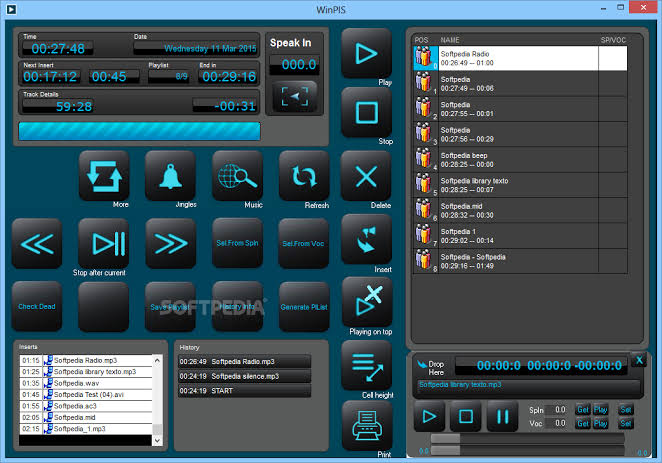
This article explores everything you need to know about WinPIS, from its core features to installation requirements, helping you understand how this software can elevate your broadcasting game.
Understanding WinPIS: More Than Just a Winamp Plugin
WinPIS functions as an external application that interacts with Winamp, adding professional-grade broadcasting features to the classic media player . Unlike traditional plugins that operate within Winamp’s interface, WinPIS runs as a separate application suite, making it powerful and stable for continuous broadcast operations.
The Two-Component Architecture
One of the defining characteristics of WinPIS is its dual-component design :
1. OnAir Application
The OnAir component serves as the broadcast controller. It’s the heart of the system that:
- Controls Winamp’s playback functions
- Writes played records to a central database
- Manages scheduled interpolations (commercials, playlists, tracks)
- Handles the insertion of jingles and sweepers at designated times
2. Client Application
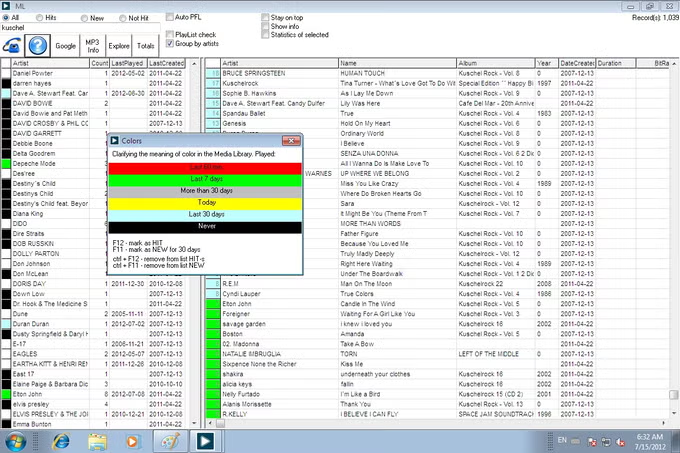
The Client component provides the management interface where broadcasters prepare and organize their content. It includes:
- A powerful media library connected to the central database
- Jingle and sweeper management
- Pre-play (PFL) functionality
- Playlist editing and scheduling tools
- Interpolation preparation for commercial blocks
This separation ensures that broadcast operations remain stable while content preparation happens seamlessly in the background.
System Requirements and Compatibility
Before diving into WinPIS, it’s crucial to understand its requirements :
| Requirement | Details |
|---|---|
| Prerequisite | Winamp must be installed on the system |
| Operating Systems | Windows XP, Vista, 7, 8, 10, and Windows Server editions |
| License Type | Trial/Demo version available for testing |
| Latest Version | 5.12.0.850 |
| File Size | Approximately 19-20 MB |
| Developer | Davor Geci |
The most critical requirement is an existing Winamp installation, as WinPIS works directly with it rather than as a standalone application . This dependency is both a strength (leveraging Winamp’s robust playback engine) and a limitation (requiring a separate media player).
Core Features of WinPIS
WinPIS is packed with features designed to meet the needs of internet broadcasters. Let’s explore these capabilities in detail.
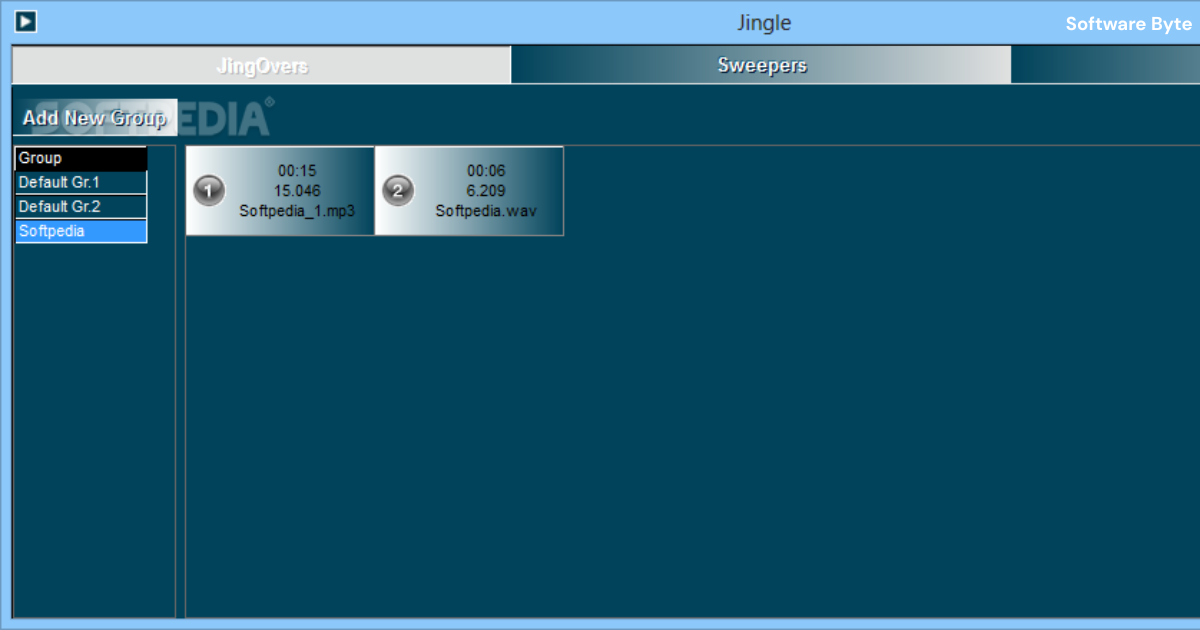
1. Jingle and Sweeper Management
Radio stations rely on jingles (short musical identifiers) and sweepers (voiceovers or sound effects for transitions) to create a professional brand identity. WinPIS provides dedicated players for these audio elements :
- Jingle Players: Separate players that can trigger jingles on demand or on schedule
- Sweeper Management: Tools to organize and deploy transition audio
- Voice Over Support: Capability to overlay spoken announcements over music beds
This feature allows broadcasters to maintain a polished, professional sound with minimal effort.
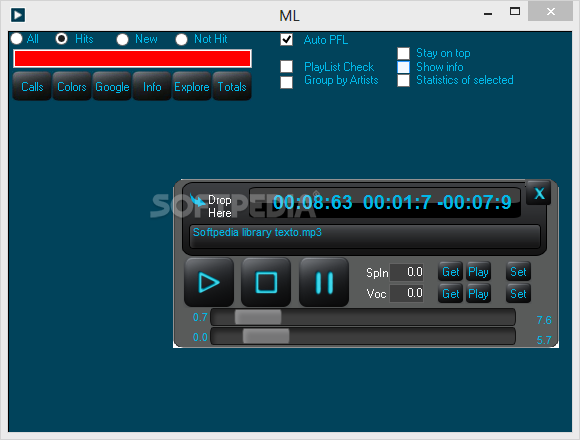
2. Pre-Play Functionality (PFL)
The Pre-Play (PFL) feature is a game-changer for live broadcasting . It allows broadcasters to preview tracks on a secondary sound card before they go live on air. This means:
- You can listen to a song before it plays for listeners
- Check audio quality and transitions without interrupting the broadcast
- Prepare upcoming segments in advance
- Maintain smooth, professional transitions
The ability to preview on a separate audio device is essential for any serious broadcaster.
3. Playlist and Commercial Scheduling
Effective radio requires careful scheduling of both music and commercials. WinPIS includes a dedicated editor for this purpose :
- Playlist Creation: Build and organize playlists for different time slots or shows
- Commercial Block Scheduling: Insert commercial breaks at specific times
- Interpolation Function: Automate the insertion of pre-configured blocks of songs or commercials
- Time-Based Automation: Program specific tracks or playlists to play at designated hours
This scheduling functionality allows stations to run automated broadcasts around the clock.
4. Central Database for Networked Environments
One of WinPIS’s standout features is its support for networked operations :
- Central Database: Stores all broadcast data, including played records, playlists, and scheduling information
- Multi-User Access: Multiple operators can work on different aspects of the broadcast from different computers
- Shared Media Library: Access the same audio files and metadata across the network
This makes WinPIS suitable not just for hobbyists but for small radio stations with multiple team members.
5. Playback Tracking and Reporting
Professional broadcasters need to know what’s been played for compliance, reporting, and proof-of-performance purposes :
- Playback History: Tracks every item played, including songs, commercials, and jingles
- Report Generation: Generate detailed reports on broadcast content
- Audit Trail: Maintain records for regulatory compliance or client verification
This feature is particularly valuable for stations that need to provide proof of commercial airing to advertisers.
6. Media Library Management
WinPIS includes a powerful media library system :
- Local Drive Scanning: Automatically scan computer drives for audio files
- Import from Winamp: Borrow playlists directly from Winamp
- Organized Collections: Create separate collections for jingles, sweepers, and overlapping audio streams
- Central Database Access: All files are cataloged for easy retrieval
This makes content management intuitive and efficient, even with large audio collections.
7. Remote and Automated Operation
For stations running unattended, WinPIS provides automation capabilities :
- Automated Playlist Generation: Create playlists automatically based on rules
- Scheduled Broadcasts: Run playlists and shows at predetermined times
- Remote Control Potential: Network capabilities allow for remote monitoring and control
How WinPIS Works
Understanding the operational flow of WinPIS helps broadcasters maximize its potential.
Installation and Setup
- Install Winamp: WinPIS requires Winamp to be installed on the system
- Download WinPIS: Obtain the software from the official website or a trusted download source
- Run Installer: The installation process sets up both OnAir and Client applications
- Launch Applications: Separate icons are created for each component
Operating OnAir
The OnAir application is the broadcast controller :
- Connect to Winamp: OnAir interfaces with Winamp’s functions
- Access Settings: Retrieve pre-made settings and playlists from the central database
- Extract Library: Access media from the Winamp library or the central database
- Manage Broadcasts: Insert jingles, sweepers, voiceovers, and manage interpolation schedules
- Play Content: Broadcast specific playlists, recorded shows, news, commercials, or individual tracks at scheduled times
Operating Client
The Client application is the content preparation tool :
- Configure Playlist Automation: Set up automated playlist generation rules
- Manage Media Library: Scan drives and import audio files
- Prepare Interpolation: Schedule pre-configured blocks of content
- Pre-Play Management: Use PFL to preview content on a secondary sound card
Archive and Logging
Both components contribute to the archiving and logging functions :
- Broadcast Logger: Records everything that goes on air
- Archiving: Preserve broadcasts for later reference
- Jingle Manager: Organize and maintain audio identity elements
Pros and Cons of WinPIS
Every software solution has its strengths and limitations. Here’s an honest assessment of WinPIS.
Advantages
| Pro | Description |
|---|---|
| Integrated Players | Dedicated jingle and sweeper players built into the system |
| PFL Capability | Pre-play on secondary sound card is a professional feature |
| Scheduling Power | Comprehensive playlist and commercial block scheduling |
| Network Ready | Central database supports multi-user operations in networked environments |
| Reporting | Tracks played items and generates detailed reports |
| Professional Features | Includes voice-over support, interpolation management, and more |
Limitations
| Con | Description |
|---|---|
| Winamp Dependency | Requires existing Winamp installation to function |
| External Application | Operates as separate application, not a native plugin |
| Dual Application Setup | Requires setup of separate OnAir and Client applications |
| Legacy Focus | Primarily designed for Windows systems up to Windows 10 |
| Potential Learning Curve | Professional features may require initial learning time |
Who Should Use WinPIS?
WinPIS is designed for specific users and scenarios:
Internet Radio Broadcasters
Anyone running an internet radio station, whether for personal enjoyment or professional purposes, will find WinPIS invaluable. The scheduling, automation, and PFL features make it suitable for both live and automated broadcasts .
Small Community Radio Stations
Community radio stations with limited budgets can use WinPIS to achieve professional broadcast quality without expensive proprietary systems. The networked database support allows multiple volunteers to contribute to the broadcast operation.
Podcasters and Content Creators
Creators producing podcast-style content can leverage WinPIS for audio preparation, editing assistance, and managing multiple audio tracks.
Hobbyists and Enthusiasts
For those passionate about radio and audio, WinPIS offers a way to experiment with professional broadcasting features using the familiar Winamp interface.
Educational Institutions
Schools and universities teaching broadcasting, media studies, or audio production can use WinPIS as a training tool.
Frequently Asked Questions
Q1: Does WinPIS work without Winamp?
No, WinPIS requires Winamp to be installed on your system to function. The software is designed to extend Winamp’s capabilities, not replace it .
Q2: What operating systems support WinPIS?
WinPIS supports Windows XP, Vista, 7, 8, 10, and various Windows Server editions . It is primarily designed for older Windows versions and may have limited support for newer systems like Windows 11 .
Q3: Is WinPIS free to use?
WinPIS is available as a trial/demo version, but full functionality typically requires a license . The trial allows users to test features before committing to purchase.
Q4: What’s the difference between the OnAir and Client applications?
The OnAir application is the broadcast controller that handles live playback and scheduling execution. The Client application is the management tool used for content preparation, library management, and configuration .
Q5: Can multiple users operate WinPIS simultaneously?
Yes, WinPIS supports networked operations with a central database, allowing multiple users to contribute to the broadcast operation from different computers .
Conclusion
WinPIS stands as a remarkable example of how a classic media player can be transformed into a professional broadcasting tool. By building upon Winamp’s robust playback engine and adding comprehensive scheduling, automation, and management features, WinPIS provides a solution that’s powerful enough for small radio stations yet accessible enough for hobbyists.
The software’s dual-component architecture ensures stability during broadcasts while enabling efficient content preparation in the background. Features like PFL (pre-play functionality), jingle and sweeper management, playlist scheduling, and central database support for networked operations make it a versatile choice for various broadcasting scenarios.
While WinPIS does have limitations—primarily its dependency on Winamp and its focus on Windows operating systems—it remains an excellent choice for anyone looking to start an internet radio station or enhance their broadcasting capabilities. The software’s professional feature set, combined with the familiarity of Winamp, creates an approachable yet powerful solution for audio broadcasting.
Whether you’re a dedicated hobbyist, a small community station, or a content creator exploring new formats, WinPIS provides the tools you need to sound professional and run your broadcast operation smoothly. By leveraging this software effectively, you can focus on what matters most—creating engaging content for your audience.