Introduction
In the world of product design and 3D visualization, the ability to transform a digital model into a stunning, photorealistic image is nothing short of magical. For years, achieving such quality required expensive studio setups, complex software with steep learning curves, and hours of tedious rendering time. Then came KeyShot, a revolutionary application that changed the game by making high-end 3D rendering accessible, fast, and surprisingly intuitive.
KeyShot (64-Bit) is a standalone 3D rendering and animation software that has become the industry standard for product designers, engineers, marketers, and 3D artists worldwide . Its claim to fame is the ability to produce photorealistic results in real-time, allowing users to see changes instantly as they apply materials, adjust lighting, or set up cameras. This immediate feedback loop accelerates the creative process, enabling rapid iteration and better design decisions.
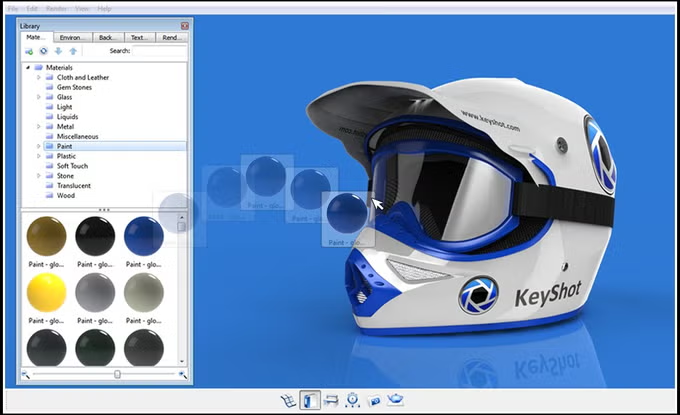
What makes KeyShot truly unique is its commitment to simplicity without sacrificing power. The “drag-and-drop” workflow makes it remarkably easy to learn, while its physically accurate render engine, based on scientific research, ensures that the final output is not just beautiful but also a true representation of how the product will look in the real world .
This article delves into the world of KeyShot (64-Bit). We’ll explore its core features, understand its system requirements, compare the historic version 3.3 with the modern capabilities of KeyShot Studio, and help you determine if this powerful tool is the right fit for your visualization needs.
What is KeyShot?
A Standalone Solution for 3D Data
KeyShot is a professional-grade, standalone application designed for creating high-quality 3D renderings and animations. While it integrates seamlessly with a wide variety of CAD and 3D modeling software, it does not require any of them to run. This means you can import models from virtually any source and begin the visualization process immediately without needing the original design application installed on your machine.
The Power of Real-Time Ray Tracing
At the heart of KeyShot is its “real-time ray tracing” engine . Ray tracing is a rendering technique that simulates the behavior of light to produce incredibly realistic images. Traditionally, this process was slow, often taking minutes or even hours to render a single frame. KeyShot revolutionized this by leveraging modern CPU and GPU hardware to deliver ray-traced results in real-time.
When you adjust a material’s color, move a light source, or change a camera angle in KeyShot, the viewport updates instantly to reflect that change. This “What You See Is What You Get” (WYSIWYG) experience is a game-changer. It eliminates the guesswork and time wasted on test renders, allowing designers to focus on creativity and fine-tuning their visuals until they achieve perfection .
A Tool for Every Industry
KeyShot’s versatility makes it a go-to solution for a diverse range of industries. Its ability to create photorealistic product visualizations is invaluable for product design, where it can help showcase concepts and iterate on ideas without the need for expensive physical prototypes . In engineering and manufacturing, it’s used to create clear, compelling visuals for technical documentation, assembly instructions, and marketing materials. Even in fields like architecture, jewelry design, and automotive design, KeyShot provides the tools needed to bring 3D models to life .
KeyShot (64-Bit) System Requirements
To run KeyShot effectively, your computer needs to meet certain hardware and software requirements. While the software is designed to be scalable—performing well on both modest machines and powerhouse workstations—understanding the specifications will help you ensure a smooth and productive experience. The following is based on system requirements for modern versions of KeyShot .
Windows Operating System
A 64-bit version of Windows is a fundamental requirement . This is because 64-bit systems can handle larger amounts of memory (RAM), which is crucial for rendering complex 3D scenes with high-resolution textures and intricate geometry.
- Operating Systems: Modern versions of KeyShot are officially supported on Windows 10 (22H2) and Windows 11, as well as newer Windows Server editions .
- Processor (CPU): A 64-bit Intel or AMD processor with SSE4.1 support or higher is required . KeyShot is designed to efficiently utilize all available CPU cores and threads . This means a processor with more cores, like a high-end Intel Core i7, i9, or AMD Ryzen 7, 9, or Threadripper, will significantly improve rendering speeds . During rendering, KeyShot is designed to use 100% of the CPU’s processing power to maximize speed, a behavior that is entirely intentional .
- Memory (RAM): At a minimum, 4GB of RAM is recommended . However, for professional work with complex scenes, 16GB, 32GB, or even 64GB is highly recommended to ensure smooth performance and prevent system slowdowns.
- Graphics Card (GPU): The GPU plays a dual role in KeyShot. For CPU-only rendering, KeyShot primarily uses the GPU to display the interface and effects, such as the Geometry View, requiring a card that supports OpenGL 2.0 or higher . For faster rendering using GPU mode, a dedicated NVIDIA or AMD GPU with ray-tracing capabilities is required, with NVIDIA RTX cards being the preferred choice for optimal performance . The minimum driver version needed for GPU rendering is also a key consideration .
- Additional Requirements: A minimum screen resolution of 1920 x 1080 is recommended, and an internet connection is required for product activation .
macOS Operating System
KeyShot is also available for macOS, providing the same powerful rendering capabilities to Mac users.
- Operating Systems: The latest versions of KeyShot support macOS Big Sur (11.7) and newer .
- Processor (CPU): As with Windows, a 64-bit Intel or Apple Silicon processor is required, and KeyShot will effectively utilize all available cores.
- Memory & Graphics: The RAM and GPU requirements are similar to the Windows version, with the system’s internal unified memory (on Apple Silicon) or dedicated RAM playing a critical role in performance.
Key Features and Capabilities
KeyShot is packed with features designed to simplify the 3D rendering workflow and deliver exceptional results. Here are some of its most powerful capabilities.
Real-Time Ray Tracing
This is KeyShot’s defining feature. The real-time viewport lets you see your scene evolve as you work. Every material change, lighting adjustment, and camera move is instantly reflected, allowing for a fluid and highly creative process .
Drag-and-Drop Material System
KeyShot’s material system is both powerful and incredibly user-friendly. A vast library of scientifically accurate, physically-based materials comes built-in . You can simply drag a material from the library and drop it directly onto your model’s geometry. The material instantly applies and updates in the real-time viewport, making it easy to experiment with different looks, from plastics and metals to glass and fabrics.
Advanced Lighting
Proper lighting is essential for photorealistic renders. KeyShot provides a complete set of lighting tools to help you achieve studio-quality results. This includes physical lights (like area lights, point lights, and spotlights) that behave like their real-world counterparts, and the groundbreaking HDRI (High Dynamic Range Imaging) environment editor . HDRI environments use an image to illuminate your scene with realistic, 360-degree lighting, and KeyShot’s editor allows you to fine-tune the intensity, rotation, and even individual lights within the environment.
Animations and Presentations
KeyShot is not just for static images; it’s a powerful tool for creating animations as well. You can easily generate various types of animations to showcase your product from every angle. This includes turntable animations (360-degree product rotations), exploded views that reveal a product’s internal components, and camera flythroughs that guide the viewer through your scene . These animations are incredibly effective for marketing, presentations, and technical documentation.
Direct CAD Integration
Despite being a standalone application, KeyShot boasts exceptional compatibility with other software. It supports direct import of over 40 different 3D file formats, enabling you to bring your designs from any CAD platform into KeyShot without data loss . The geometry, colors, names, and assembly structure are all preserved .
Furthermore, the LiveLinking feature creates a dynamic connection between KeyShot and your CAD software . If you make a design change in your CAD application, you can sync that change with KeyShot with a single click. Your materials, textures, animations, and camera angles remain intact, allowing you to update your visuals instantly as your design evolves.
High-Quality Output
The ultimate goal of any rendering software is the final output, and KeyShot delivers. It is designed to produce physically correct results from the very first render . This accuracy—based on scientific research in global illumination and material physics—ensures that the final image is not just beautiful but also a reliable representation of the physical product, making it trustworthy for engineering, manufacturing, and marketing decisions .
A Look Back: KeyShot 3.3 and the Evolution of 3D Rendering
KeyShot 3.3 Features and Specifications
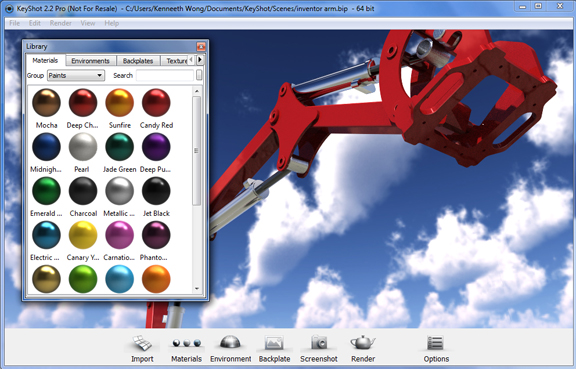
The CNET download page focuses on KeyShot version 3.3, a release from August 2012 that was significant for introducing features now considered standard . This version was a major step forward, focusing on enhancing user control and interactivity.
The standout feature of KeyShot 3.3 was the introduction of KeyShotVR . This patent-pending technology allowed users to create interactive, 3D representations of their products that could be viewed on any HTML5-enabled web browser, including on mobile devices, without the need for any special plugins . Users could choose from four different VR types to produce a touch-enabled, 360-degree experience to embed on any webpage, offering a revolutionary way to present products online at the time.
Another key improvement was the new Color Selector . This tool, accessible from the Project panel, gave users the ability to pick any color from anywhere on their screen and add it to a custom palette. This seemingly simple feature significantly streamlined the workflow for designers who needed to match specific brand colors or color themes from other applications.
KeyShot 3.3 also continued Luxion’s commitment to direct CAD compatibility by adding support for Autodesk Inventor 2013 files . Importers for NX, Parasolid, Creo, and other major CAD platforms received updates and bug fixes, ensuring better data fidelity and a smoother workflow. The full specifications for KeyShot 3.3 on CNET highlight that it was a 64-bit application designed for Windows systems [URL content].
The Evolution to Modern KeyShot Studio
The journey from KeyShot 3.3 to the modern “KeyShot Studio” represents a massive leap in technology and capability. While the core concept of real-time, physically accurate rendering remains, the execution has become vastly more powerful and feature-rich.
KeyShot Studio has evolved from a primarily CPU-based renderer to one that fully leverages the power of both CPU and GPU. Modern versions offer a true GPU rendering mode that can drastically reduce render times, especially for complex scenes, by utilizing the parallel processing power of modern graphics cards .
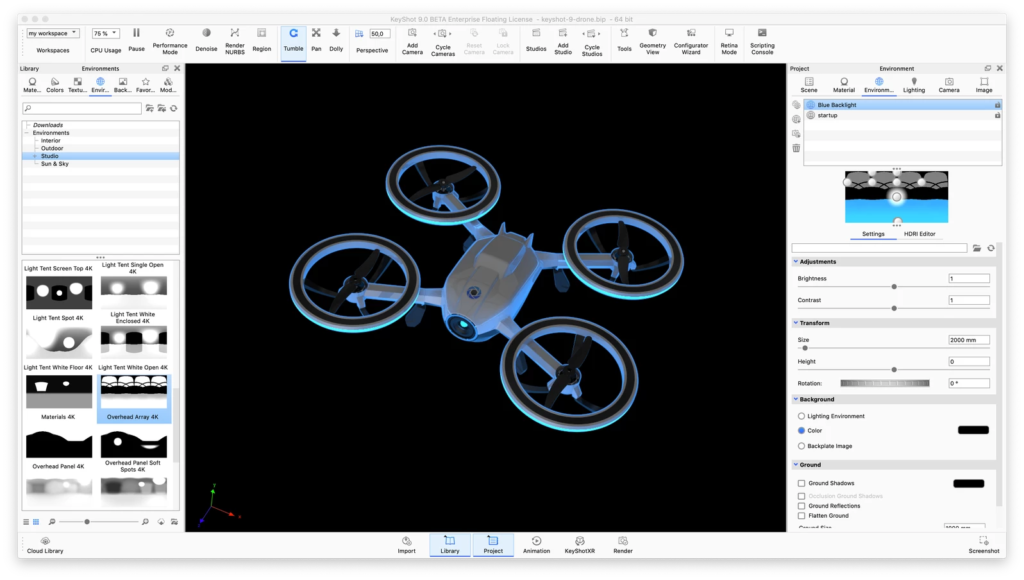
Today’s KeyShot is also part of a larger ecosystem. The modern “Studio” branding reflects a shift towards being a comprehensive platform for all visual needs . It integrates more seamlessly with a wider variety of design and marketing tools, offers advanced features like procedural texturing, and even includes integrated AI tools like KeyShot Studio AI for generating new material styles, backgrounds, and exploring visual concepts from text prompts .
Key Differences: KeyShot 3.3 vs. Modern Versions
| Feature | KeyShot 3.3 (2012) | KeyShot Studio (Modern) |
|---|---|---|
| Core Technology | Primarily CPU-based rendering | Hybrid CPU & GPU rendering |
| Key Feature | KeyShotVR for 3D web content | Real-time ray tracing with AI denoising |
| Interface | Streamlined for its era | Modern, customizable, ribbon-based UI |
| Rendering Power | Utilized CPU cores effectively | Utilizes all CPU cores and modern GPUs (NVIDIA RTX) |
| AI Integration | None | KeyShot Studio AI for Restyling, Backgrounds, and Ideation |
| System Requirements | Windows XP, Vista, 7 | Windows 10/11 |
Pros and Cons of KeyShot
Based on user and expert feedback, KeyShot is a powerful tool with distinct advantages and a few limitations.
Pros
- Ease of Use: The drag-and-drop interface, intuitive controls, and real-time feedback make KeyShot one of the easiest professional 3D rendering tools to learn .
- Stunning, Photorealistic Quality: KeyShot consistently produces exceptional, physically accurate results that are ready for client presentations and marketing materials .
- Real-Time Workflow: The ability to see changes instantly accelerates the design process, enabling rapid iteration and experimentation .
- Broad File Format Support: Directly imports over 40 3D file formats, ensuring compatibility with almost any CAD or 3D modeling software .
- Complete Standalone System: No need to own or learn CAD software to use KeyShot effectively. It’s a self-contained solution for 3D visualization [URL content].
Cons
- CPU & GPU Dependency: While powerful, KeyShot’s performance is heavily tied to hardware. Rendering complex scenes can be extremely demanding on both CPU and GPU . The entirely CPU-based rendering of older versions could be a limitation [URL content]. Modern versions solve this with GPU support .
- Licensing Cost: KeyShot is a professional-grade tool with a corresponding price tag. While offering a free trial, full licenses, especially for professional and enterprise features, represent a significant investment .
- Limited Advanced Post-Processing: While KeyShot includes some post-processing tools, users requiring extremely detailed image compositing and manipulation often export their renders to dedicated software like Photoshop for final touches.
FAQs About KeyShot (64-Bit)
1. Is KeyShot free to use?
Answer: KeyShot is primarily a commercial software. However, it does offer a free trial version that allows potential users to explore its features and functionality before making a purchase. The trial version typically has limitations, such as watermarks on final renders, but it provides full access to the core tools . For students and educators, KeyShot offers special educational licenses at a reduced cost.
2. What is the difference between CPU and GPU rendering in KeyShot?
Answer: KeyShot can render using either your computer’s Central Processing Unit (CPU) or Graphics Processing Unit (GPU), or both . CPU rendering is the traditional method and is highly reliable, effectively using all available CPU cores . GPU rendering, introduced in later versions, uses the power of your graphics card (like an NVIDIA RTX card) to significantly accelerate rendering times, especially for complex scenes with intricate lighting and materials . The choice often depends on your specific hardware and scene complexity.
3. What operating systems are compatible with KeyShot?
Answer: KeyShot is compatible with both Microsoft Windows and Apple macOS. On Windows, it runs on Windows 10 (22H2) and Windows 11 . For macOS, it supports versions from macOS Big Sur (11.7) and newer . A 64-bit operating system is a strict requirement for both platforms .
4. What file formats can KeyShot import?
Answer: KeyShot is known for its extensive file format support, directly importing over 40 different 3D file formats . This includes native formats for major CAD software like SolidWorks, Autodesk Inventor, Creo, NX, and Rhino, as well as standard formats like OBJ, FBX, and STL . The geometry, colors, names, and assembly structure are typically preserved during import.
5. Why does KeyShot use 100% of my CPU while rendering?
Answer: This is intentional behavior, not a bug . KeyShot is designed to use all available CPU cores and threads to maximize rendering speed. By default, it will utilize 100% of the CPU’s processing power for the fastest possible render times. While rendering, you may notice your system becomes less responsive. For this reason, it is often recommended to limit KeyShot’s CPU usage to 50-88% through the software’s preferences, which allows background processes to run smoothly while you continue with other tasks .
Conclusion
KeyShot has firmly established itself as a premier solution for 3D rendering and product visualization. Its journey from the real-time ray-tracing pioneer to the comprehensive platform known as KeyShot Studio is a testament to its ongoing innovation and unwavering commitment to user experience. Whether you are a seasoned industrial designer, an engineer creating technical visuals, or a marketer producing stunning product imagery, KeyShot provides the tools you need to bring your ideas to life .
The 64-bit version underscores the software’s power, enabling it to handle the massive datasets and complex calculations required for high-end rendering. From the impressive capabilities of version 3.3 to the modern, AI-enhanced workflows of today, KeyShot remains dedicated to making professional 3D visualization fast, accurate, and accessible. While it comes with a cost and requires significant hardware resources, its ability to save time, reduce the need for physical prototypes, and produce photorealistic results makes it an invaluable asset for any organization or individual serious about 3D visualization .