In the world of computing, one of the most persistent frustrations for Windows users is encountering a file format they simply cannot open. Perhaps the most common culprit in this scenario is the DMG file—the disk image format used by macOS for distributing software, transferring data, and creating archives.
If you’ve ever downloaded a Mac application only to find it’s packed in a .dmg file, you know the sinking feeling of realizing your Windows PC can’t read it. It’s a compatibility wall that separates two of the world’s most popular operating systems, and for those who work across platforms, it can be a significant roadblock.
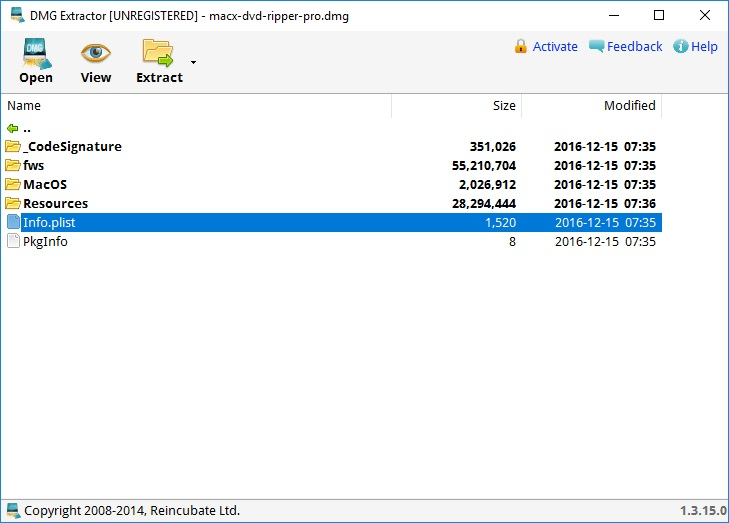
This is where DMG Extractor for Windows comes to the rescue. This specialized utility is designed to bridge the gap between the Mac and Windows worlds, allowing Windows users to open, explore, and extract the contents of DMG files without needing access to a Mac computer. In this comprehensive guide, we will explore everything you need to know about DMG Extractor, from its core functionality and key features to how it compares to other tools and why it might be the perfect solution for your cross-platform file needs.
Understanding DMG Files: What They Are and Why They’re a Problem on Windows
To appreciate the value of DMG Extractor, it’s helpful to understand what a DMG file actually is. DMG stands for “Disk Image” and is a file format used natively by Apple’s macOS operating system. Think of a DMG file as a digital container that holds files and folders, much like a virtual hard drive or a physical CD. It is the standard format used for software distribution on Macs. When you download an application for a Mac, it almost always arrives as a DMG file.
How Mac Users Interact with DMG Files
On a Mac, opening a DMG file is a seamless process. You simply double-click the file, and macOS mounts it as a virtual drive, similar to inserting a USB stick or a CD. The mounted disk image appears on the desktop, and you can open it, explore its contents, and copy files out of it. Once you’re done, you can unmount or “eject” the virtual drive.
Why Windows Can’t Natively Read DMG Files
Windows was built on a different foundation than macOS. It uses different file systems (NTFS, FAT32, exFAT) and does not natively support the file system used for DMG images, which is typically HFS+ (used by older Macs) or APFS (used by newer Macs). As a result, when you try to open a DMG file on a Windows PC, you are met with an error message. The file system is simply not recognized, making the file’s contents inaccessible.
This incompatibility creates a significant challenge for users in mixed-OS environments. A Windows user might receive a DMG file from a colleague, need to access archived data from an old Mac backup, or download a software installer that was only distributed in DMG format.
What Is DMG Extractor for Windows?
DMG Extractor is a software utility specifically designed to address this compatibility challenge. It allows users of the Microsoft Windows operating system to open, view, and extract files from macOS DMG disk images. Its primary appeal lies in removing the compatibility barriers between macOS and Windows environments, enabling seamless file access across platforms.
The Core Purpose of DMG Extractor
The tool focuses on straightforward file access, allowing users to quickly retrieve installers, archives, or bundled data stored inside disk images . Rather than requiring users to convert formats manually or use complex command-line tools, DMG Extractor provides a simple, intuitive way to extract the contents of DMG files into accessible folders . This makes it an invaluable tool for anyone who frequently receives macOS files on a Windows system, especially for software distribution or data sharing.
Who Uses DMG Extractor?
IT Professionals: System administrators and technical support staff often need to access DMG files for software installation, driver updates, or system maintenance. DMG Extractor provides a direct way to extract critical data on the fly.
Creative Professionals and Designers: Graphic designers, video editors, and other creatives often receive files from Mac-using clients. DMG Extractor allows them to access these files without needing a Mac.
Businesses and Organizations: Companies with mixed IT environments often need to transfer files between Mac and Windows systems. The software is a practical solution for cross-platform data exchange.
Casual Users: Anyone who has encountered a DMG file while browsing the internet or receiving files from a friend can benefit from this software.
Students: Students frequently use mixed platforms for their academic work and may encounter DMG files from professors or collaborators.
Key Features of DMG Extractor
DMG Extractor is packed with features designed to make the process of extracting DMG files as simple and efficient as possible. Its focused feature set ensures that users can access the contents of DMG files without unnecessary complexity.
Direct DMG File Extraction
The core functionality of the tool is its ability to extract the complete contents of a DMG file. You can open an Apple disk image and view its contents without any additional conversion steps . This direct approach saves time and effort, allowing you to get to the files you need quickly.
Support for Compressed and Encrypted DMG Files
Not all DMG files are created equal. Some are compressed to save space, and others are password-protected (encrypted) for security. DMG Extractor supports both types of files . It can handle the decompression of compressed DMG formats and can also open password-protected (encrypted) files, provided you have the correct password. This makes the software suitable for professional or technical file transfers where security layers are often applied .
Simple Drag-and-Drop Functionality
One of the standout features of DMG Extractor is its user-friendly drag-and-drop interface. Users can simply drag a DMG file into the application window to begin the extraction process. This reduces the need for technical configuration or command-line tools, making the software accessible to beginners who only need to open files quickly without learning additional software workflows.
Windows Explorer Integration
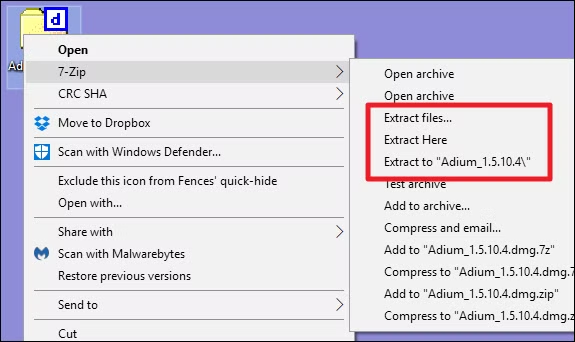
The software often integrates with the Windows shell, allowing users to right-click on a DMG file and select the option to extract its contents. This integration streamlines the workflow, making it even faster to access the data you need.
Compatibility with Modern Windows Versions
The developers have focused on ensuring that the software is compatible with the latest Windows operating systems. The newest versions have improved compatibility with modern Windows systems, ensuring that users on Windows 10, Windows 11, and other versions can rely on the tool.
Comparison with Other Tools
While DMG Extractor is a specialized tool, it’s not the only option for opening DMG files on Windows. Understanding the alternatives helps clarify why DMG Extractor is often the preferred choice.
7-Zip: This popular open-source archive manager is a powerful tool for a wide range of file formats, including DMG files. However, its support for DMG is often limited and may not handle all types of DMG files effectively, particularly those that are compressed or encrypted. It can sometimes struggle with the complexity of the file system, making it less reliable for extracting all data.
WinRAR: Similar to 7-Zip, WinRAR supports DMG files but may lack the specialized handling needed for more complex disk images. It might fail to extract files correctly or have issues with file system permissions.
PowerISO: This tool supports a wider range of disk image formats, including DMG. However, it is a more comprehensive and expensive tool, offering features that many users may not need. It is less specialized than DMG Extractor and may not always handle the nuanced structure of DMG files as smoothly.
HFSExplorer: This is a freeware tool that can read Mac-formatted disks (HFS+) and DMG files. It is a more technical tool and does not offer the same user-friendly, one-click extraction experience as DMG Extractor. It requires users to understand file system concepts and may not support newer APFS formats.
Why DMG Extractor Stands Out
DMG Extractor’s main advantage is its specialization. It was built specifically for one purpose: extracting files from DMG files. This focus means the developers have dedicated significant effort to ensuring it works reliably with the various types of DMG files a user might encounter. Compared with more generic archive tools like 7-Zip or WinRAR, DMG Extractor is built specifically for Apple disk images. Its simplicity and efficiency make it the preferred choice for users who value a no-fuss, reliable extraction process.
Performance and Reliability
Based on user reviews and the software’s description, DMG Extractor is praised for its performance and reliability. It is described as a lightweight application that performs efficiently, even during large file operations. The software’s focused feature set ensures that it doesn’t consume excessive system resources, allowing users to multitask while extracting files.
Handling Large and Complex Files
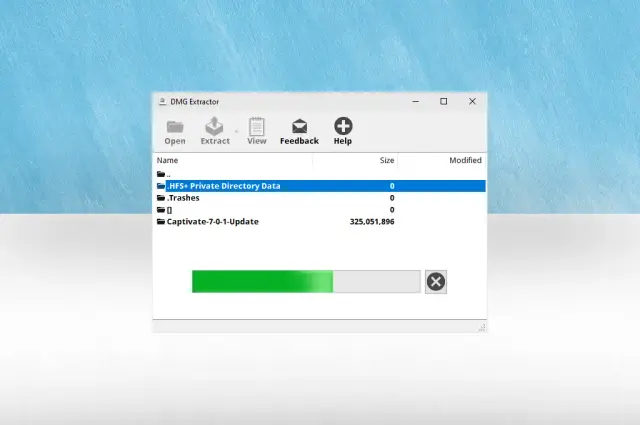
The latest versions have enhanced stability during large file extraction, making the software capable of handling substantial disk images without crashing or becoming unresponsive. This is a crucial feature for users who need to extract large software installers or backup files.
Handling Different DMG File Types
The software is capable of handling a wide range of DMG file types, including both read/write and compressed disk images. It also handles password-protected files, ensuring that even the most complex DMG files can be processed.
Pros and Cons of Using DMG Extractor
To provide a balanced view, it’s important to highlight both the strengths and limitations of DMG Extractor.
Pros
Easy-to-Use Interface: The software is designed with simplicity in mind, making it accessible to users of all skill levels. The drag-and-drop functionality and straightforward interface ensure that anyone can extract files from a DMG quickly.
Direct DMG Extraction: It provides direct support for opening and extracting DMG files, eliminating the need for complex conversions or technical knowledge.
Handles Encrypted and Compressed Files: The ability to open password-protected and compressed DMG files makes it a versatile solution for professional and technical use.
Lightweight and Efficient: The application has a minimal footprint on system resources, ensuring it runs quickly without slowing down your PC.
Cons
Limited to DMG-Related Functionality: The software is hyper-specialized. It does not support other disk image formats or provide advanced disk-editing tools. If you need to work with ISO, IMG, or other image formats, you will need additional software.
Feature Set Depends on Version: Some features, particularly handling of advanced encryption or file system types, may be dependent on the version of the software. It is always advisable to use the latest version for the broadest compatibility.
Lack of Advanced Disk Editing Tools: Unlike more comprehensive utilities like PowerISO, DMG Extractor does not allow you to edit disk images directly or create new DMG files.
Frequently Asked Questions (FAQs)
1. What is a DMG file, and why can’t Windows open it natively?
A DMG (Disk Image) file is a format used by Apple’s macOS to distribute software and store data. It’s like a virtual hard drive. Windows can’t open DMG files because they use a file system (typically HFS+ or APFS) that Windows does not natively support. This is why you need a tool like DMG Extractor to access the contents of DMG files on a PC.
2. Can DMG Extractor open encrypted or password-protected DMG files?
Yes, DMG Extractor can open password-protected DMG files. When you attempt to extract the contents of an encrypted DMG file, the software will prompt you to enter the password. This is an essential feature for accessing secure DMG files.
3. Is DMG Extractor free to use?
DMG Extractor is available as a freeware utility. However, it’s always a good idea to check the official website for the most up-to-date licensing and pricing information, as software policies can sometimes change.
4. Are there any alternatives to DMG Extractor for extracting DMG files?
Yes, there are alternatives, including 7-Zip, WinRAR, PowerISO, and HFSExplorer. However, many of these tools either lack full support for all DMG file types or are more complex to use. DMG Extractor is specifically designed for this task, offering a more reliable and user-friendly experience.
5. Does DMG Extractor support the latest versions of Windows?
Yes, the latest version of DMG Extractor has improved compatibility with modern Windows systems, including Windows 10 and Windows 11. The developers actively update the software to ensure it works with the latest Windows updates and security protocols.
Conclusion
DMG Extractor for Windows is a specialized utility that effectively solves a common compatibility problem. It provides a simple, reliable, and efficient way for Windows users to access the contents of macOS DMG files without needing to own a Mac or learn complex technical skills. Its user-friendly interface, support for encrypted and compressed files, and integration with Windows Explorer make it an invaluable tool for IT professionals, creative individuals, and casual users alike.
While the software is limited to DMG-related functionality and lacks advanced disk editing features, this specialization is also its strength. It ensures that the tool does one job and does it exceptionally well. DMG Extractor stands as a testament to the idea that the best tools are often those built for a single purpose. For anyone who regularly interacts with the macOS world from a Windows PC, DMG Extractor is an essential addition to their software toolkit, ensuring that file compatibility barriers never stand in the way of productivity.