Introduction
SQLite stands as one of the most widely deployed database engines in the world. Powering everything from mobile applications and web browsers to embedded systems and desktop software, this lightweight, serverless database offers remarkable versatility. Yet despite its simplicity and effectiveness, managing SQLite databases efficiently requires the right tools—especially as projects grow in complexity.
Navicat 15 for SQLite (32-bit) emerges as a powerful solution to this challenge. As part of the renowned Navicat family of database management tools, this specialized edition provides a comprehensive graphical interface for SQLite database administration and development. This article explores the features, capabilities, and value proposition of Navicat 15 for SQLite, examining what makes it a compelling choice for developers, database administrators, and data professionals working with this popular embedded database.
Understanding SQLite and Its Popularity
What Makes SQLite Special
SQLite differs fundamentally from traditional client-server database systems like MySQL, PostgreSQL, or SQL Server. Rather than operating as a separate server process that applications connect to, SQLite exists as a C library that applications link directly into their code. The entire database is stored as a single ordinary disk file, making it incredibly portable and easy to manage.
This architecture brings several advantages. There’s no separate server process to install, configure, and maintain. Database access is incredibly fast since there’s no network communication overhead. Backups are as simple as copying a file. These characteristics have made SQLite the most deployed database engine, with billions of copies in active use worldwide.
When SQLite Makes Sense
SQLite excels in scenarios where simplicity and reliability matter more than scalability. Mobile applications, desktop software, embedded devices, and small to medium-sized websites all benefit from its zero-configuration approach. It’s particularly valuable for development and testing, where the ability to work with a portable database file simplifies version control and deployment.
However, the very simplicity that makes SQLite attractive can become a limitation as projects grow. Without proper management tools, tasks like schema design, data manipulation, performance optimization, and data migration become cumbersome. This is where Navicat steps in.
What Is Navicat 15 for SQLite (32-bit)?
Navicat for SQLite is a specialized database administration and development tool designed specifically for SQLite databases. Version 15 represents a mature iteration of this product, offering a rich feature set tailored to the needs of SQLite users. The 32-bit version is compatible with Windows operating systems including Windows 7, Windows 8, Windows 10, and Windows Server.
Key Features at a Glance
The software provides comprehensive support for SQLite features, working seamlessly with both SQLite version two and version three databases. Users gain access to a visual interface that simplifies every aspect of database management, from initial design to ongoing maintenance.
Core Capabilities of Navicat 15 for SQLite
Complete Database Object Management
Navicat provides intuitive tools for working with all SQLite database objects. Users can create, modify, and manage tables, views, triggers, and indexes through a clean graphical interface. The software displays the master table and all sub-objects, giving developers complete visibility into their database structure.
This visual approach to database management eliminates the need to memorize and type complex SQL syntax for routine operations. Instead, developers can focus on their data models and business logic rather than wrestling with command-line tools.
Data Modeling Tools
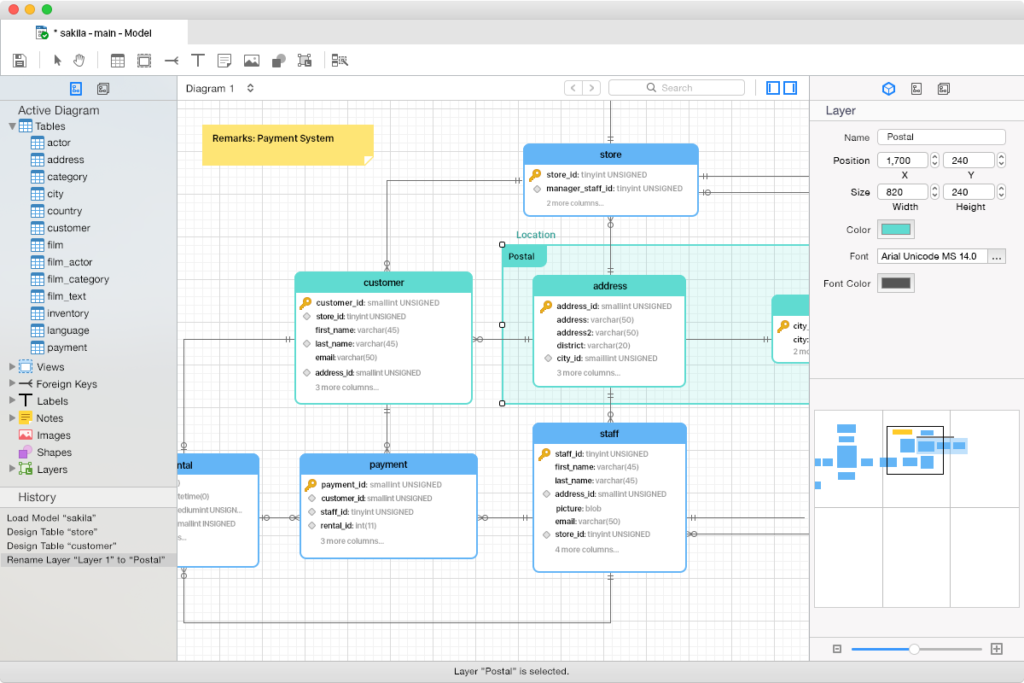
One of the standout features of Navicat is its integrated data modeling capability. This tool allows database designers to create visual representations of their database schemas, including tables, relationships, and constraints. The modeling environment supports both forward engineering (creating databases from models) and reverse engineering (generating models from existing databases).
Data modeling is particularly valuable during the initial design phase, allowing teams to visualize and refine their database structure before implementation. It also aids in documentation and communication, as models provide clear diagrams that non-technical stakeholders can understand.
Report Builder and Data Visualization
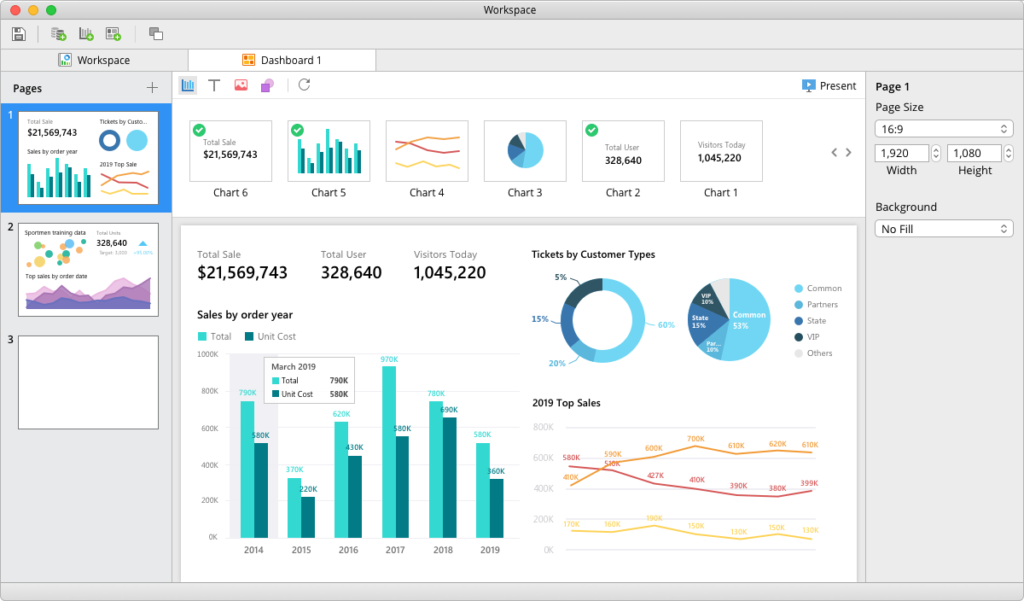
Navicat includes a built-in report builder that enables users to create professional reports from their database data. This feature is valuable for presenting information to stakeholders, documenting database contents, or creating data extracts for analysis.
Multiple Connection Support
The software supports connections to both local and remote SQLite databases. This flexibility is important in modern development workflows, where databases might be stored locally during development but deployed to remote servers or cloud environments in production. Being able to manage databases in both locations from a single interface streamlines the development lifecycle.
SQL Editor and Query Builder
For those who prefer to work directly with SQL, Navicat provides a powerful SQL editor with syntax highlighting, code completion, and query execution capabilities. The integrated query builder offers a visual alternative, allowing users to construct complex queries through a drag-and-drop interface—particularly helpful for those less comfortable with SQL syntax.
Who Benefits from Navicat 15 for SQLite?
Application Developers
For developers building applications that use SQLite as their database backend, Navicat offers substantial productivity gains. Tasks like database schema design, data population, query testing, and debugging become significantly faster and more intuitive.
Database Administrators
While SQLite databases are often simpler to administer than enterprise database systems, they still require management. Administrators responsible for multiple SQLite databases or for supporting development teams benefit from the centralized management capabilities Navicat provides.
Data Analysts
Analysts working with SQLite databases can use Navicat to explore data structures, run ad-hoc queries, and generate reports. The visual interface reduces the learning curve for those who aren’t SQL experts.
Quality Assurance Professionals
QA teams can use the tool to prepare test data, validate database schemas, and verify that applications interact correctly with their underlying databases. The ability to easily inspect and modify test databases is invaluable for thorough testing.
Considerations and Limitations
Platform Constraints
The 32-bit version of Navicat for SQLite runs exclusively on Windows. While this covers a large user base, those working on macOS or Linux systems would need a different version or alternative tools. The software is also specifically limited to SQLite databases, so users working with multiple database systems might need additional Navicat editions.
Security and Collaboration Features
The editor’s review notes that the software’s description doesn’t explicitly mention advanced security features or team collaboration capabilities. Organizations with stringent security requirements or those needing multi-user management functionality should verify whether Navicat meets their specific needs.
Cloud Integration
Cloud database integration isn’t explicitly mentioned in the feature set. For teams using cloud-based SQLite deployments or hybrid architectures, this could be a consideration when evaluating the tool against alternatives.
Navicat 15 for SQLite in the Modern Database Ecosystem
Positioning Among Competitors
Navicat competes in a crowded field of database management tools. Alternatives range from free, open-source solutions like SQLiteStudio and DB Browser for SQLite to commercial offerings with broader database support. Navicat’s value proposition lies in its polished user experience, comprehensive feature set, and the reputation of the Navicat brand.
The Importance of Professional Tools
While SQLite’s command-line interface and simple API make it accessible, professional tools like Navicat unlock its full potential. They transform database management from a tedious, error-prone process into an efficient, enjoyable activity. For professionals who spend significant time working with databases, the productivity gains justify the investment.
Conclusion
Navicat 15 for SQLite (32-bit) represents a mature, comprehensive solution for managing SQLite databases. With support for SQLite versions two and three, powerful data modeling capabilities, intuitive visual interfaces, and robust connection management, it addresses the needs of developers, administrators, and data professionals alike.
While the tool has some limitations—notably the lack of explicit cloud integration and advanced security features—its core functionality makes it an excellent choice for anyone serious about SQLite database management. For Windows users working with SQLite databases, Navicat provides a professional-grade environment that streamlines workflows and enhances productivity.
The popularity of SQLite continues to grow, driven by the expansion of mobile computing, IoT devices, and embedded systems. Tools like Navicat that bridge the gap between SQLite’s simplicity and the complex needs of modern development will remain essential components of the database professional’s toolkit.
Frequently Asked Questions
What is Navicat 15 for SQLite (32-bit)?
Navicat 15 for SQLite (32-bit) is a graphical database administration and development tool specifically designed for SQLite databases. It provides a user-friendly interface for managing all aspects of SQLite databases, including tables, views, triggers, indexes, and queries. The 32-bit version runs on Windows operating systems including Windows 7, 8, 10, and Windows Server.
What SQLite versions does Navicat support?
Navicat for SQLite supports both SQLite version two and version three databases. This broad compatibility ensures that users can manage databases created with either version, making the tool suitable for working with legacy systems as well as modern applications.
What are the key features of Navicat for SQLite?
Key features include data modeling tools for visual database design, a report builder for creating professional reports, multiple connection support for local and remote databases, a powerful SQL editor with syntax highlighting, and comprehensive management of database objects like tables, triggers, indexes, and views. The software also supports viewing the master table and all sub-objects.
Is Navicat for SQLite available for Mac or Linux?
The 32-bit version described is specifically for Windows. However, Navicat does offer versions for macOS and other platforms. Users should check the official Navicat website for information about the latest platform support and available editions.
How does Navicat compare to free SQLite management tools?
Navicat offers a more polished, comprehensive user experience compared to many free alternatives. It includes features like data modeling, report building, and professional-grade database management capabilities that may be absent or less developed in free tools. The choice between Navicat and free options depends on user needs, budget, and the complexity of their database management requirements.