Losing important data from an iPhone can be a stressful experience. Whether it’s cherished photos, crucial contacts, or vital text messages, the feeling of loss is universal. The iStonsoft iPhone Data Recovery software offers a potential lifeline, providing a way to retrieve lost files from your device . This guide explores its features, capabilities, and limitations.
What is iStonsoft iPhone Data Recovery?
iStonsoft iPhone Data Recovery is a Windows-based software utility designed to help users recover lost or deleted data from their iPhones. It targets a variety of file types, including text content (contacts, messages, notes) and media files (photos, videos, voice memos). The software offers two primary methods for data recovery: directly from the iPhone itself and from existing iTunes backup files .
Key Recovery Features
Wide Range of Recoverable Data
The software is capable of recovering a comprehensive list of file types:
- Text Contents: Contacts, call history, text messages, notes, calendar entries, and Safari bookmarks .
- Media Contents: Photos, camera videos, SMS attachments, voice memos, and recordings.
Three Main Recovery Modes
The software provides flexibility by offering three distinct recovery methods, catering to different scenarios.
1. Direct Recovery from iPhone
This mode is for users who have access to their physical device. You connect your iPhone to your Windows PC, and the software scans the device’s storage to find recoverable files. This is particularly useful if you have accidentally deleted files and haven’t yet overwritten them.
2. Recovery from iTunes Backup
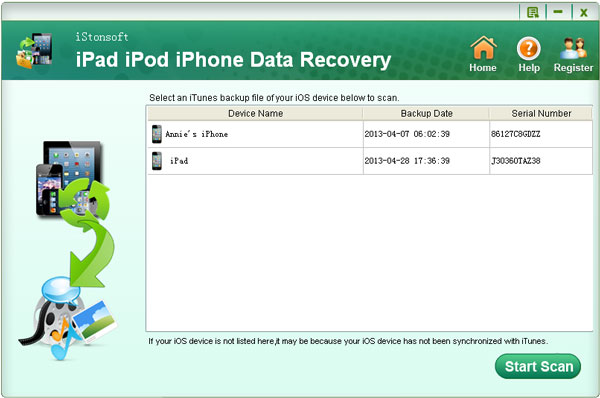
Many users regularly back up their iPhones using iTunes. iStonsoft allows you to scan these existing backup files and extract specific data, such as contacts or messages, without needing to restore the entire backup to your phone. This is a major advantage because it lets you retrieve specific lost items without disrupting your current device setup .
3. Recovery from iCloud Backup
The software also provides the ability to recover data from iCloud backups, offering a third avenue for data retrieval.
Advanced Preview and Selective Recovery
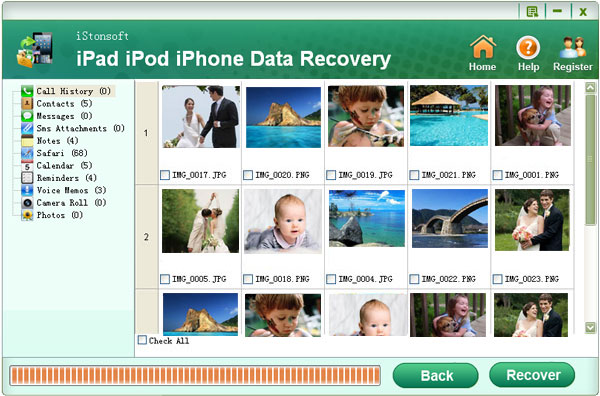
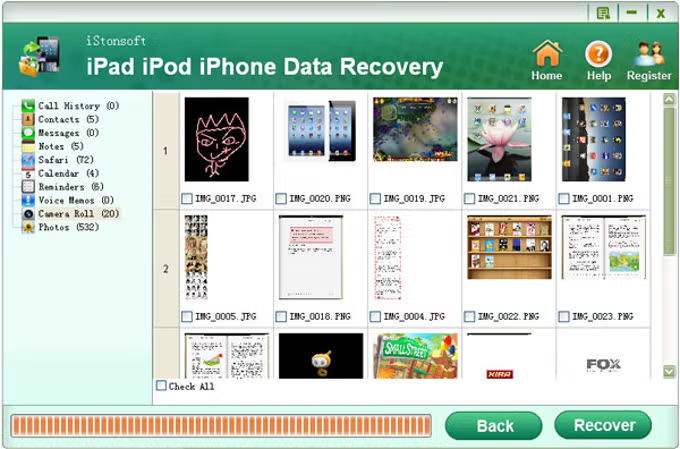
A key feature of the software is its versatile preview function. During the scanning process, you can preview recoverable files. This allows you to selectively choose which files to recover. This saves time and ensures you are only restoring the data you actually need.
Who is iStonsoft iPhone Data Recovery For?
General Users
Anyone who has lost important data on their iPhone and wants a straightforward way to try and get it back. This could be due to accidental deletion, a failed iOS update, or a device malfunction.
Users with Broken Devices
One of the software’s standout features is its ability to recover data from broken or inaccessible iPhones. If your phone has a black screen, is physically damaged, or is otherwise unresponsive, this tool can often still extract data from it .
Users Avoiding a Full Restore
It is an excellent solution for people who have an iTunes backup but don’t want to perform a full system restore. It allows you to extract individual files without losing your current phone data.
Performance and Speed
The developer claims the software incorporates an “exclusive innovated decryption technology” that results in recovery speeds up to 10 times faster than normal software. While this may vary depending on your system and the amount of data, it suggests the software is optimized for efficient performance.
Important Limitations
Compatibility
The software explicitly supports iPhone 5, iPhone 4S, iPhone 4, iPhone 3GS, and iPhone 3. It does not mention compatibility with newer iPhone models. This is a critical consideration for users with more recent devices, as they may encounter compatibility issues.
Licensing and Pricing
The software’s listing mentions a “free version” that supports scanning only, not actual recovery. This means you will likely need to purchase a license to restore your files. The specific pricing details are not provided in the source material.
User Interface
The software’s user interface is not discussed, but given its vintage, it may not have a modern or intuitive design. Users expecting a sleek, modern interface might be disappointed.
How to Use the Software
- Connect Your Device: Connect your iPhone to your Windows PC using a USB cable.
- Select Recovery Mode: Choose whether to recover from the device, an iTunes backup, or an iCloud backup.
- Scan Your Device/Backup: Initiate a scan. The software will analyze the selected source for recoverable data.
- Preview and Select: Once the scan is complete, you can preview the found files. Select the specific items you want to recover.
- Recover: Start the recovery process to save the selected files to your computer.
Frequently Asked Questions (FAQs)
1. What types of data can iStonsoft iPhone Data Recovery recover?
It can recover a wide variety of data, including contacts, call history, text messages, notes, photos, videos, voice memos, and more, from both text and media categories .
2. Can I recover data from a broken iPhone?
Yes, the software is designed to restore iPhone files from devices that are inaccessible, have a black screen, or are physically broken/crashed/lost.
3. Does the software work with iCloud backups?
Yes, in addition to direct device recovery and iTunes backup extraction, the software also supports recovery from iCloud backups.
4. Is the free version of the software fully functional?
No, based on user feedback, the free version only supports scanning. You will likely need to purchase a license to actually recover and save your data.
5. Does the software support the latest iPhone models?
The source material only explicitly mentions support for older models, including the iPhone 5, 4S, 4, 3GS, and 3. Compatibility with newer models is not specified.
Conclusion
iStonsoft iPhone Data Recovery is a functional tool that can be a lifesaver for users with older iPhone models who have lost data. Its ability to recover directly from the device, from iTunes backups, and from iCloud backups provides flexibility. However, its lack of stated support for newer iPhones and the need for a paid license are significant drawbacks. Overall, it’s a specialized tool that could be highly useful for a specific niche of iPhone users.